
3. What you will create
A smooth, 10-second interior walkthrough through the kitchen, dining area, living room, walk-through wardrobe, study and bathroom. Camera motion comes from a real 3D scene; six finished images define the materials and lighting.
The Viewport video defines where the camera moves; the renders define how the apartment looks. A text description alone cannot reliably preserve the floor plan.
This example uses Modern Apartment Interior Design. For your own apartment, use your own scene and renders. The link identifies the source; the paid 3D model is not included in the downloads.
4. What you need
- 3ds Max and a textured apartment scene. This project used 3ds Max 2026; the bridge must support your installed version.
- Codex with local file access and a configured 3ds Max MCP bridge. Asking to connect MCP does not install a bridge: check the connection first.
- Image generation in Codex/ChatGPT. This example used built-in image generation; all six finished frames are included.
- A VizTools AI account with access to the required video model and sufficient coins. The original workflow used Seedance 2.5 and Motion Transfer. Check the current mode, six-image support, duration and price before running it.
- Existing apartment renders, if available, as material and lighting references. They must not replace the camera angle from the Viewport.
A ChatGPT Pro subscription is not a verified requirement. You need access to the features used and sufficient limits. Generation cost and processing time depend on the current service.
5. Prepare the scene and camera motion
Step 1. Open the scene and check the connection
Open the project in 3ds Max and paste prompt A into Codex. Confirm that it identifies the correct scene. Save a working copy before making changes.
Step 2. Build the route
Use prompt B. The example starts near the kitchen, shows the shared living space, passes through the wardrobe to the study desk, then returns through the bathroom view to the starting composition. The route must exist in the model; do not send the camera through a wall to make a transition.
Export the motion video at 10 seconds, 16:9, 1920×1080, 30 fps. If the Max animation is longer, fit the entire route into that duration rather than cutting off everything after the first 10 seconds. The saved example compresses the full 20-second animation into a 10-second MP4.
Use a wide rectilinear lens, level camera and straight verticals. Slow gently at key views without stops or jerks. Do not widen the lens until the room distorts just to include more furniture. The source prompts mention a 108° FOV; this belongs to the example camera, not every apartment.
Step 3. Check the Viewport before generation
Watch the entire MP4. Doors must open correctly; the camera must avoid furniture and walls. Fix missing materials, cut walls, black ceilings and clipping. Real dark shelves or black bathroom fixtures should remain dark.
The kitchen fronts in this scene are white. Do not turn them beige, black or marble because of a viewport display error. Check the bathroom finishes too: black holes in walls are not intended materials.
Step 4. Save six frames
Take every frame from the same camera and route. Save the full 16:9 image without interface elements, selection outlines or borders. Each reference render must match the camera position in its corresponding motion frame.
| No. | Finished render | View |
|---|---|---|
| 1 | key_01.png | Kitchen, white island and apartment overview |
| 2 | key_02.png | Dining table and connection to the kitchen |
| 3 | key_03.png | Living room, sofa, coffee table and window |
| 4 | key_04.png | Walk-through wardrobe |
| 5 | key_05.png | Desk and study beyond the wardrobe |
| 6 | key_06.png | Bathroom and shower |
6. Codex prompts
Prompts A–C are translated from the saved instructions for this project. They are reusable commands, not a transcript of the original conversation.
Prompt A. Connect and inspect
Show prompt
Connect the 3ds Max MCP bridge to Codex. First check whether a compatible bridge is installed and the intended 3ds Max instance is available. If already connected, do not reinstall anything. Check the main-thread response, current scene name, units and available cameras. Do not open another file or modify the scene during this check. If the bridge is missing, prepare setup for my Max version and explain what I need to do.Prompt B. Cameras, video and six renders
Show prompt
Work with the open apartment scene. Save a working copy first. Inspect the layout, openings and materials. Create a connected camera route from the entrance through the apartment and back to the starting view. Show the kitchen, dining area, living room, wardrobe, desk beyond the wardrobe and bathroom only if those areas actually exist in the model.
Prepare six wide establishing keyframes. Keep the camera at a realistic height, level, with straight verticals and a wide rectilinear lens without fisheye distortion. Do not pass through walls, furniture or closed doors. If a door blocks the route, animate it opening correctly, respecting its hinges and avoiding intersections.
Fit the entire route into 10 seconds, 16:9, 1920×1080, 30 fps. Slow gently at key views. Save the Viewport video and six frames from those same cameras. Generate a photorealistic image for each frame using built-in image generation and my finished renders as material and lighting references. Preserve the layout, furniture, perspective and proportions. Check black wall areas, missing materials and clipped geometry before generation. If 10 seconds makes the route too fast, tell me and suggest a shorter route; do not increase duration or cost on your own.
Prompt C. Prepare the video prompt
Show prompt
Write a Seedance 2.5 prompt using the uploaded motion video and six images of this apartment. First map the actual reference labels in the selected service to kitchen, dining area, living room, wardrobe, study desk and bathroom. The video defines the trajectory and room connectivity; the images define materials and light. Do not invent attachment names or extra rooms. Requirements: 10 seconds, 16:9, 1080p; continuous motion that slows at key views, straight verticals, no deformation, morphing or flicker. Return a ready-to-use English prompt within the interface limit. Do not start paid generation.7. Generate the six images
For each view, attach its corresponding Viewport as Image 1, followed by renders of the same apartment for materials and lighting. Generate each frame separately. Check framing, verticals, furniture and white cabinetry before moving on.
The six prompts below are preserved verbatim in English and arranged in video-upload order. Image 1 means the Viewport for that specific view, not the first file in the entire package. Copy the complete prompt.
Use original kitchen and shared-room views for the kitchen and dining area; a living-room view for the living room; the original bathroom render for the bathroom; and a wardrobe view for the wardrobe and desk. Adapt material and object names to your own scene. The example's original references are on the model page; this lesson displays the six finished results.
Frame 1. Kitchen
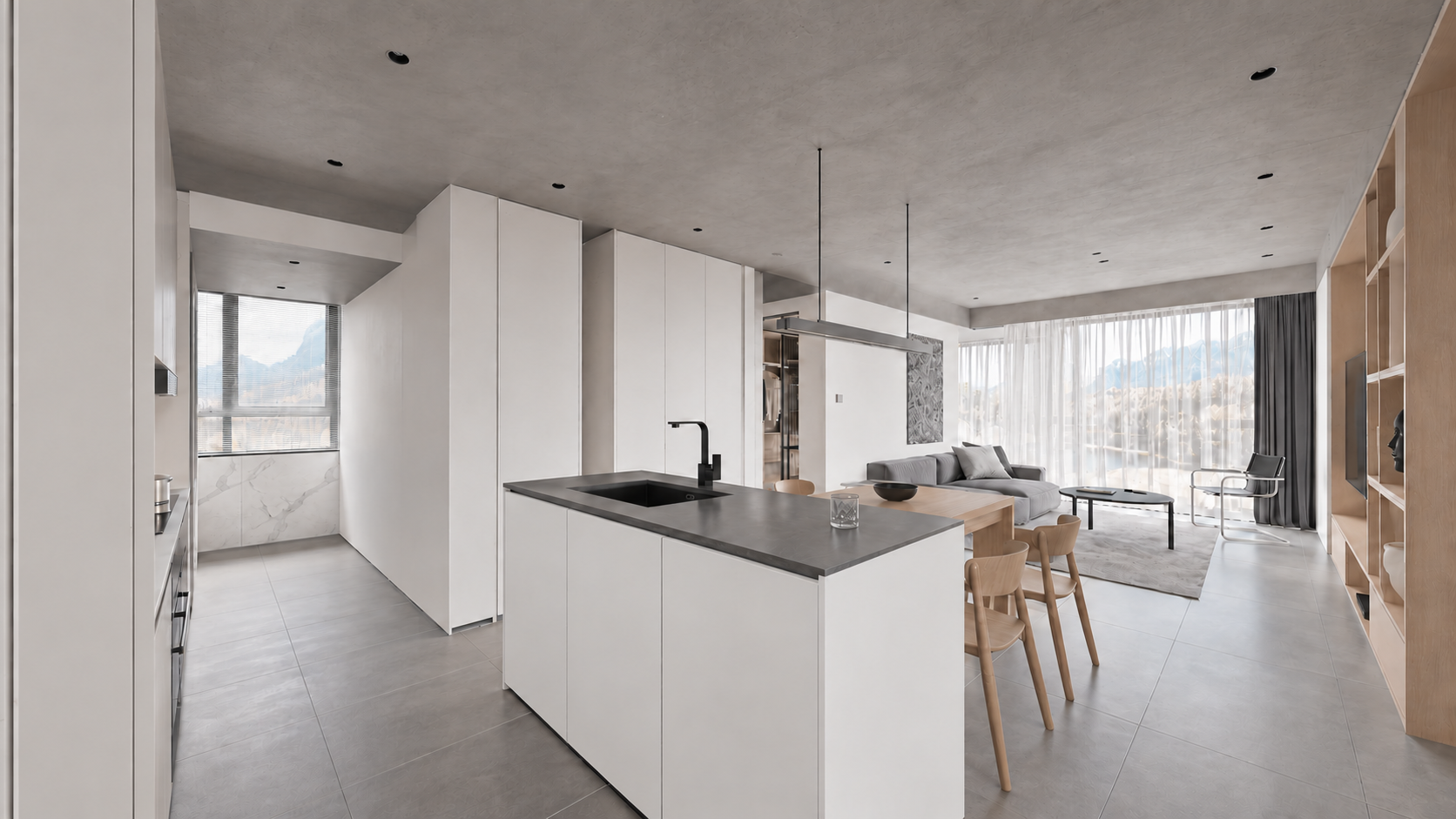
File: assets/key_01.png. Prompt: prompts/render_01.txt.
Show prompt
Use case: sketch-to-render. Turn image1 into a photoreal WIDE LEVEL architectural interior keyframe, 16:9. Image1 is the geometry and CAMERA source: preserve its exact expansive 108-degree rectilinear view from entrance/kitchen toward dining and living, all frame boundaries, island scale and location, doorway, walls, all furnishings and ceiling. Do not crop, zoom or narrow the angle. All verticals precisely upright, no roll or fisheye. Image2 defines correct kitchen materials; image3 defines the connected living/dining finishes only, never copy these reference camera crops. In viewport image1 the mottled white cabinet texture and black ceiling are display errors: replace with smooth satin white handleless cabinetry and light grey concrete ceiling. Charcoal solid island counter and black faucet, realistic stainless steel details, subtle white marble backsplash, medium grey large stone tiles, pale oak dining table/chairs/TV shelving, grey linen sofa at rear, round black coffee table, chrome cantilever chair, sheer white curtains and charcoal drapes. Consistent soft neutral daylight, physical reflections and detailed restrained textures, premium natural real-estate interior photography. Keep foreground kitchen island, whole central dining area and living room visible together exactly like image1. No added objects, no people, text, border or watermark. Output one 16:9 full-width image.Frame 2. Dining area
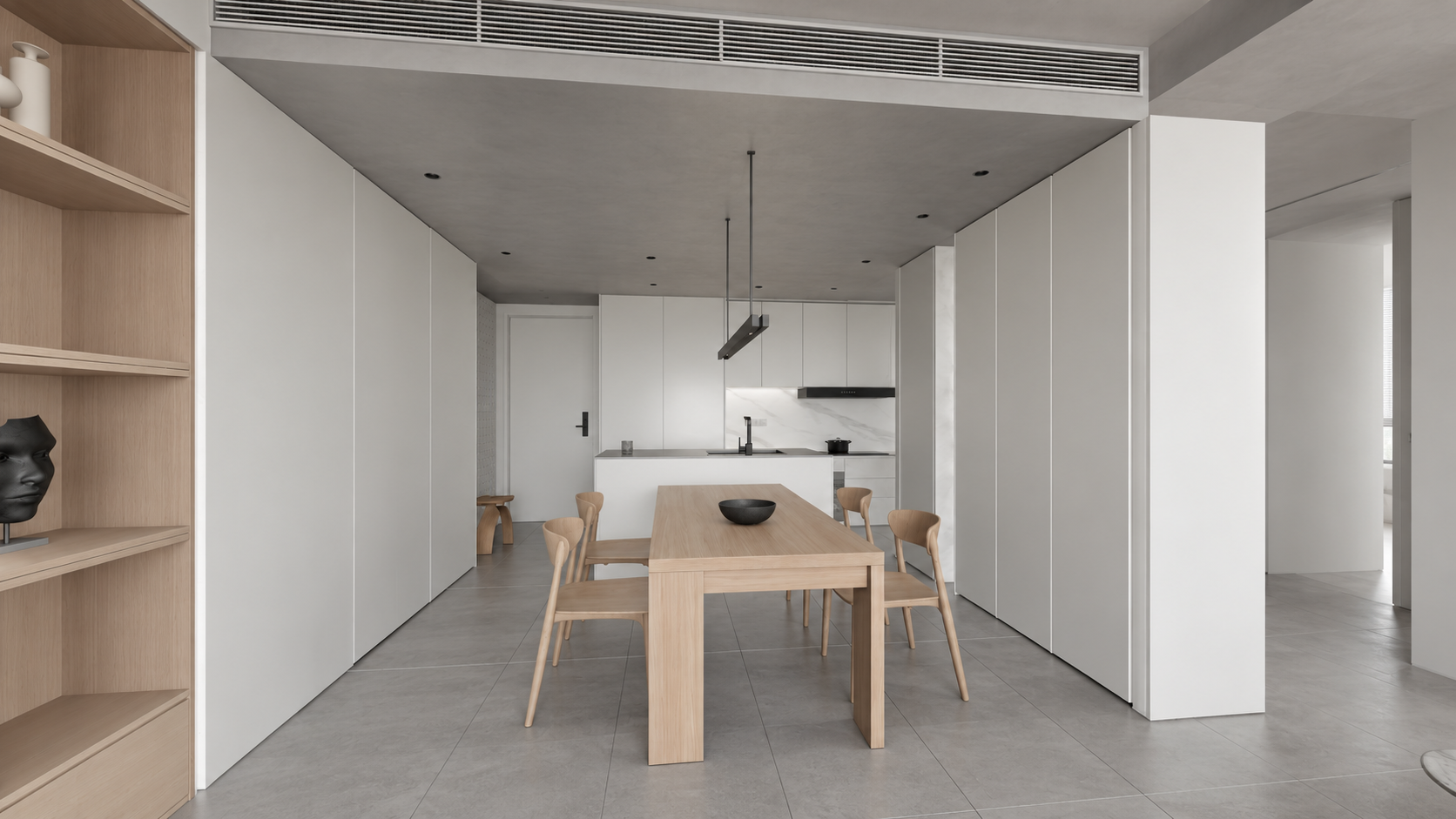
File: assets/key_02.png. Prompt: prompts/render_02.txt.
Show prompt
Use case: sketch-to-render. Photoreal architectural keyframe for the SAME apartment video. Image 1 EDIT TARGET is a very wide LEVEL 16:9 camera viewport; lock its geometry, room layout, camera position, 108 degree rectilinear perspective, all four crop boundaries and object sizes. Do not zoom in or change the angle. Keep perfectly parallel verticals and level horizon. Image 2 is exact-apartment kitchen MATERIAL reference; image 3 exact-apartment living/dining MATERIAL reference, not camera references. Render viewport image 1 from the living room toward the entire dining table and kitchen behind: pale oak rectangular table with four curved oak chairs and dark shallow bowl, floating minimalist metal pendant; pale oak shelving at left, tall white cabinetry on the right, white kitchen island with dark counter and black faucet at rear, offwhite walls, light grey concrete ceiling with recessed lights and linear HVAC grille, large medium grey matte stone floor tiles. The blotchy viewport material on cabinets is incorrect: cabinetry is smooth satin WHITE as reference2, not marble; marble only on kitchen backsplash. Match soft neutral daylight and restrained white/grey/pale oak palette, realistic texture scale and contact shadows. Preserve wide visible circulation at both sides and generous room context. No new decor, people, typography, borders, watermark. Final landscape 16:9, wide full-room view with straight verticals.Frame 3. Living room
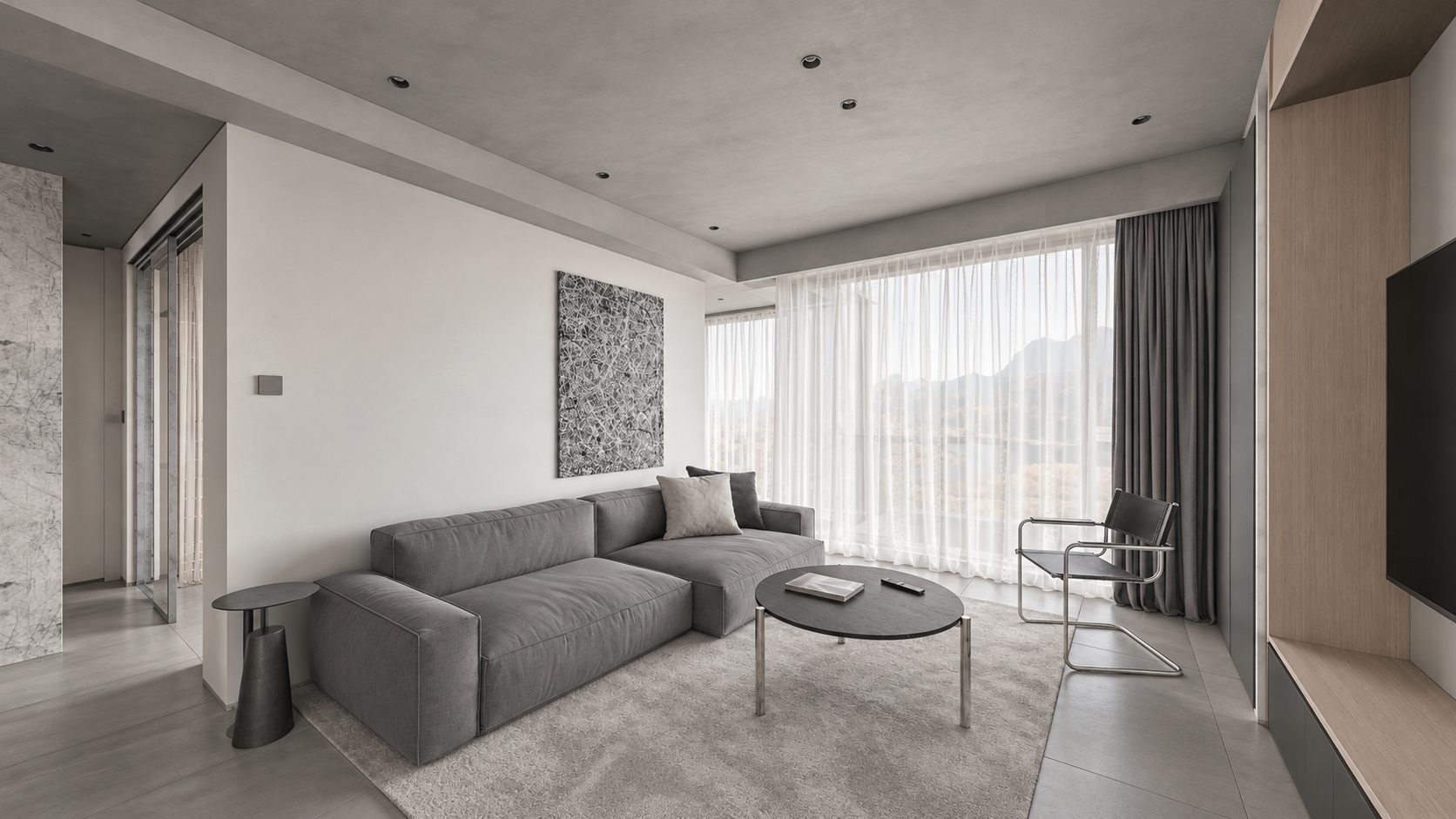
File: assets/key_03.png. Prompt: prompts/render_03.txt.
Show prompt
Use case: sketch-to-render. Create a photoreal architectural interior keyframe for an apartment walkthrough, landscape 16:9. Image 1 is the EDIT TARGET: a newly approved WIDE LEVEL camera viewport. Strictly preserve its camera position, broad 108-degree rectilinear field of view, all four frame boundaries, geometry, room dimensions, object arrangement, proportions and visible adjacent doorways. Do NOT zoom, crop, recenter or narrow the camera. All vertical architectural lines must stay perfectly vertical, no camera roll, no converging verticals, no fisheye. Image 2 is MATERIAL AND LIGHTING reference of the exact same apartment from another view: never adopt its camera crop. Render the whole wide living room of image 1: entire long grey linen sofa and low side tables, black round coffee table, light grey rug, black/chrome chair, tall sheer white curtains and charcoal drapes, pale oak TV shelving at right, left circulation visible. Soft natural neutral daylight, realistic subtle textures, light grey concrete ceiling rather than black viewport shading, off-white plaster, medium grey large stone floor tiles. Muted white/grey/pale-oak palette. Convert incorrect purple viewport side-table material to matte charcoal like reference. Keep actual furniture designs. Physically plausible soft shadows and reflections, editorial high-end Corona-like interior photograph. No new furniture, people, decorations, lettering, borders or watermark. Preserve the expansive composition of image 1 exactly. Output one landscape 16:9 frame.Frame 4. Walk-through wardrobe
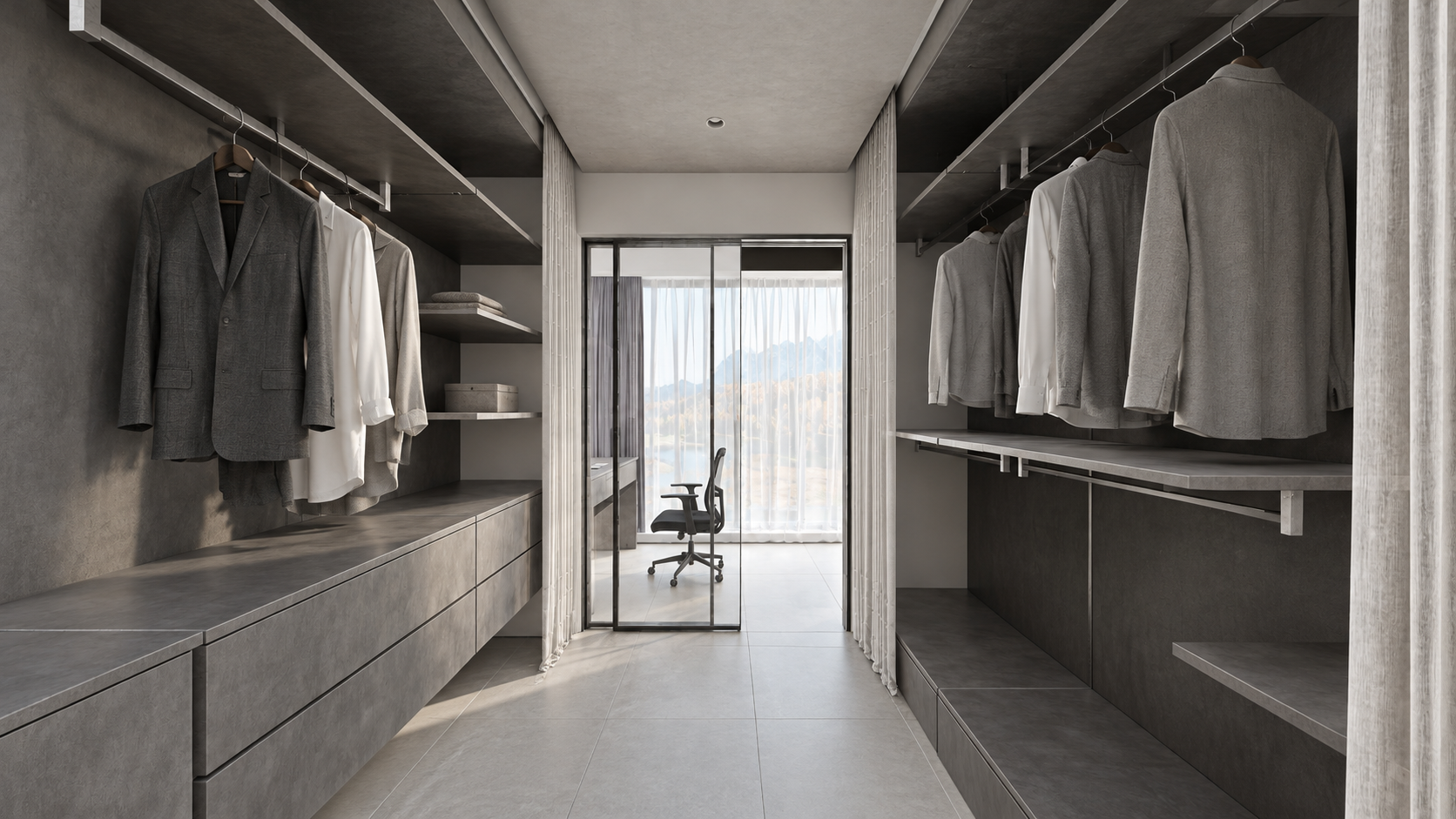
File: assets/key_04.png. Prompt: prompts/render_04.txt.
Show prompt
Use case: sketch-to-render. Create a photoreal WIDE LEVEL apartment dressing-room keyframe from image1, landscape16:9. Image1 is EDIT TARGET and authoritative geometry/framing: keep camera exactly, very wide rectilinear field of view, all four borders, shelves/drawers and hanging clothes on BOTH sides, entire floor passage, doorway to small study and chair ahead, white curtains and partially open glass sliding panel. Image2 is exact-apartment material/daylight reference, not camera: don't copy its narrower crop. Preserve perfectly straight upright verticals, no pitch/roll/fisheye and no zoom. Replace viewport black shading with realistic charcoal-grey textured storage, grey and white fabric shirts on rails, grey drawer fronts, light grey tiled flooring, pale grey concrete ceiling, clear glass panel with slim black frame at far end, black study chair, soft white curtains and neutral natural daylight from the end window. Match restrained original CGTrader architectural photography, realistic subtle roughness, soft contact shadows and tactile fabrics. Correct noise-like viewport curtain texture to clean fabric without changing curtain shape. No extra objects, people, captions, borders or watermark. Keep full-width broad spatial view, not a close-up.Frame 5. Study beyond the wardrobe
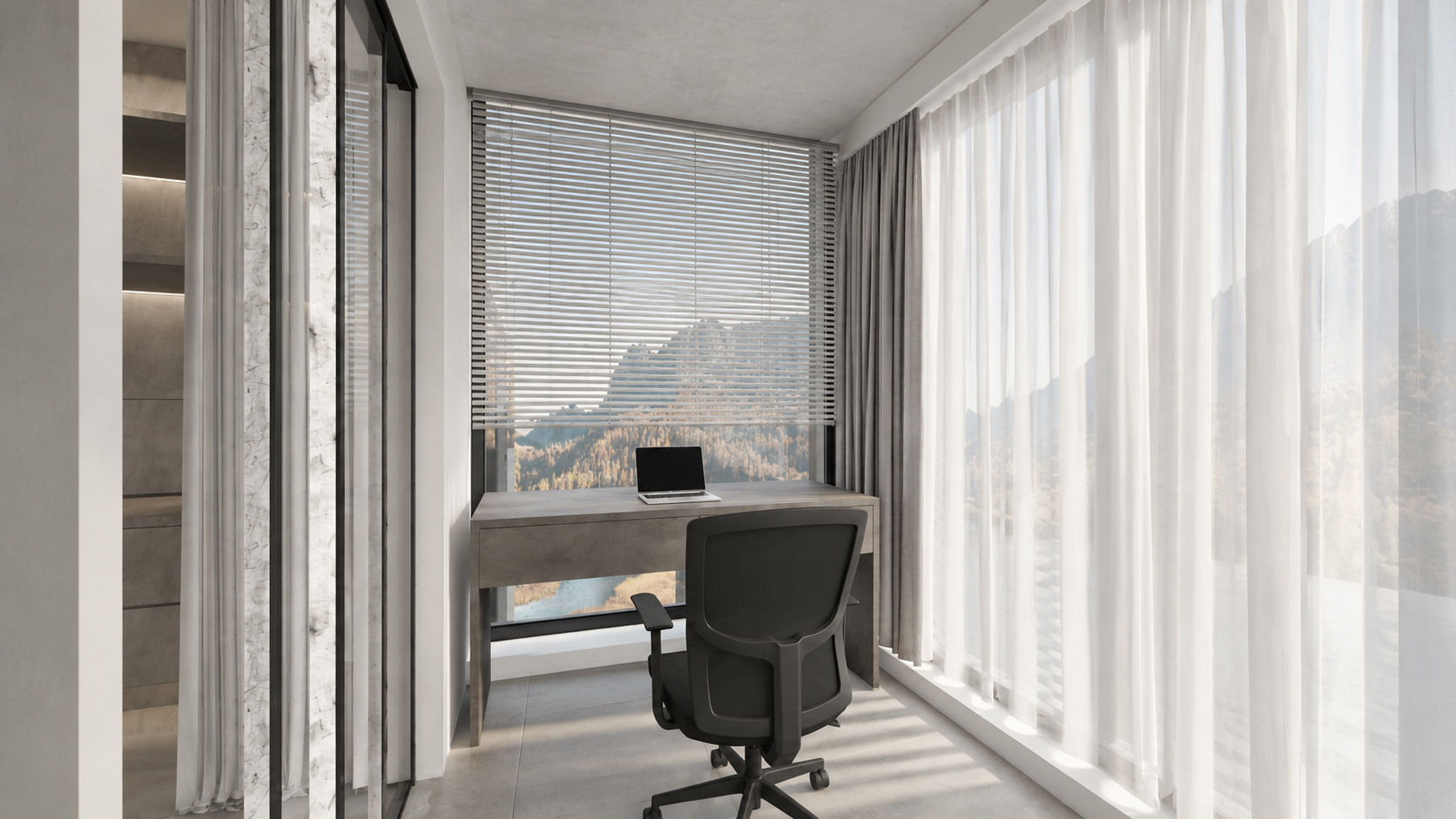
File: assets/key_05.png. Prompt: prompts/render_05.txt.
Show prompt
Use case: sketch-to-render. Image1 is the EDIT TARGET, a wide LEVEL 16:9 viewport of the small study AFTER the walk-through wardrobe in this apartment. Render this exact view photorealistically: fixed viewpoint, all walls and geometry, very wide rectilinear framing, no crop or zoom, perfectly vertical architectural lines with zero roll or tilt. Image2 is the material/light reference for the connected same-apartment wardrobe, not a framing reference. Show the entire study setup from image1: floating charcoal-grey textured two-drawer desk in front of the far window, thin silver laptop on desk, black ergonomic swivel chair on casters, tall horizontal white venetian blinds above desk, floor-to-ceiling sheer white curtains along right and slim curtain/doorway at left, grey large stone tiled floor, pale grey concrete ceiling, white/plaster window reveals. Material display black strips at ceiling edge are NOT black holes: render continuous actual plaster/grey concrete surfaces and normal thin shadow gaps. Preserve structural boundaries, do not invent an extra room/window/furniture. Gentle soft neutral daylight, subtle shadows, tactile real fabrics, controlled whites, same contemporary minimal white-grey apartment as reference. No people, no extra decor, no text, borders or watermark. Output one wide landscape16:9 real-estate interior photograph suitable as sixth keyframe of a coherent tour.Frame 6. Bathroom
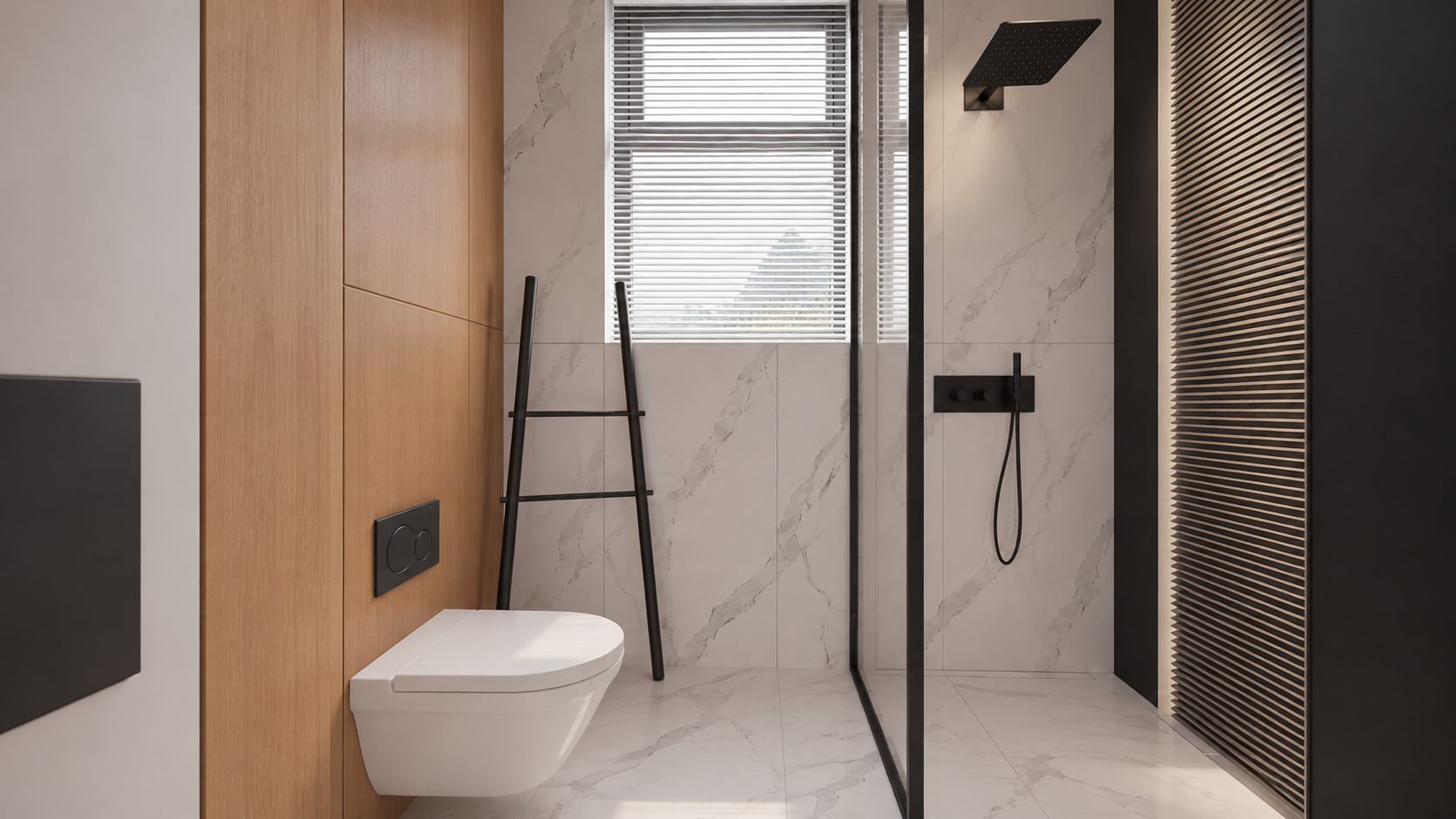
File: assets/key_06.png. Prompt: prompts/render_06.txt.
Show prompt
Use case: sketch-to-render. Edit image1, a WIDE LEVEL 16:9 bathroom viewport, into a photoreal interior keyframe. Preserve image1 camera, exact wide field of view, room width, entire visible toilet, glass shower enclosure at right, black rainfall shower and handheld shower, tall back window blinds, leaning ladder, left door/jamb and all geometry positions. Image2 is the original exact-bathroom MATERIAL reference, NOT the framing (it is a tight portrait and must NOT be copied). Keep landscape16:9 and all four boundaries from image1, do not zoom. Perfectly straight upright verticals, level horizontal camera, no distortion or fisheye. Materials per image2: the toilet is smooth pure white ceramic NOT marble, left toilet wall warm natural oak panels, flushplate matte black, ladder matte black, back/shower walls and floor subtle white marble with delicate grey veining, clear glass in slim black frame, black shower hardware, white horizontal window blinds. Soft neutral daylight; physically correct gentle highlights and glass transparency. Slatted panel at extreme right remains in place. Make a realistic premium architectural photograph, natural restrained contrast. Preserve actual compact bathroom dimensions, no room enlargement, no new furniture, no people, text, border or watermark. Output a single wide16:9image.Local corrections used in this example
After creating the six images, we corrected the kitchen material separately. One incorrect cabinet front does not require regenerating the entire interior.
White vertical island fronts; keep the dark worktop. Attach the generated kitchen image as Image 1.
Show prompt
Precise object material edit of image 1. Change ONLY the kitchen island's vertical cabinet fronts and its vertical right end panel from charcoal stone to smooth satin WHITE painted cabinetry, matching the white tall cabinets and the original apartment design. Keep the thin charcoal countertop, black sink and faucet unchanged. Preserve exactly every pixel's composition, wide perspective, level straight verticals, all geometry and details, lighting, colors, furniture, framing and 16:9 aspect ratio. Do not alter anything else. One finished photoreal image.The tall left panel incorrectly turned black. Image 1 is the render; Image 2 is the corrected Viewport of that panel. This is an additional saved correction prompt. The included keyframes remain the version used for the lesson, not a newly generated set.
Show prompt
Edit the FIRST image only. It is a finished photorealistic interior render, preserve its exact framing, geometry, furniture, white kitchen island body, dark charcoal countertop and black faucet, oak table and shelving, grey sofa, pale concrete ceiling, daylight and exposure. Fix ONE error: the large full-height vertical cabinet side/front panel at the extreme LEFT edge occupying approximately the leftmost 10% of the frame is wrongly jet black. Make that existing full-height cabinetry panel matte off-white/light warm grey, matching the nearby white cabinetry. Preserve its original seams and straight vertical edges, realistic soft shading. Do not remove the panel, do not change the camera, do not widen or crop. The SECOND image is the corrected 3ds Max viewport showing the proper light colour for this exact left cabinet panel; use it only as colour/geometry evidence for that panel. Keep every other pixel/content as close as possible to the FIRST image. White cabinet panels must read light, never as black holes. Keep intentional black appliances, faucet and charcoal countertop dark. Photoreal high quality, full-bleed 16:9.8. Create the video in VizTools AI
- Open VizTools AI Studio.
- Choose Seedance 2.5 and a mode supporting a motion video plus multiple images. The example used Motion Transfer. If that mode is unavailable, check the available model and mode instead of silently substituting single-image generation.
- Upload
viewport_motion_10s.mp4to the motion-video field. Ensure the service uses all 10 seconds. - Add
key_01.pngthroughkey_06.pngas separate image references in that order, not as a contact sheet. - Read the actual attachment labels and map them to rooms. They may differ from
@img1through@img6; the corrected kitchen was@img7in the older session. - Paste the prompt below. Replace filenames with the actual reference labels if the interface uses them. Prompt C can help Codex do this.
- Choose 10 seconds, 1080p, 16:9, one variant, without audio. Check the displayed price, then start generation.
- Download the full MP4 and inspect every room transition. The six images guide appearance; they are not a request for a slideshow.
Reusable Seedance prompt
This portable version is preserved from the materials package. Filenames are explicit; match them to your interface's reference labels before running it.
Show prompt
Create a single continuous, photorealistic 10-second architectural walkthrough of the exact apartment shown in the references.

Use viewport_motion_10s.mp4 as the camera-motion and spatial-layout reference. Follow its camera path, viewpoint order, framing and turns. Use the six still images as appearance references for their corresponding spaces:
key_01.png: kitchen with white cabinetry, a grey stone island and an adjoining oak dining table.
key_02.png: dining area looking toward the kitchen.
key_03.png: living room with a grey sofa, round dark coffee table, oak cabinetry and sheer curtains.
key_04.png: walk-through wardrobe with dark shelving and a glazed doorway toward the study.
key_05.png: study desk and office chair beside the corner windows.
key_06.png: bathroom with pale marble, oak panelling, black fixtures and a glass shower enclosure.

The video controls movement and room connectivity; the images control finished materials, lighting and detail. Do not reproduce unrendered viewport shading, overlays, selection outlines or missing-surface artifacts. Do not turn the six references into a slideshow or morph between unrelated compositions.

Move as a steady, smoothly operated camera at natural eye level, with gentle acceleration and deceleration and a slight easing of motion near the reference viewpoints. Preserve the reference route and endpoints. Keep architectural verticals straight, the horizon level and the wide rectilinear perspective stable. No sudden zooms, speed ramps, camera roll, cuts, crossfades, teleportation or passing through walls, furniture or closed glass.

Keep the exact floor plan, room dimensions, openings, furniture positions and architectural proportions. Objects remain fixed and consistent as the camera moves. Doors move only if this happens in the motion reference, using the correct hinges or sliding tracks.

Match the six finished images: soft neutral daylight, consistent exposure and white balance, natural oak, white cabinetry, grey stone and tile, pale marble, realistic fabric and physically plausible glass reflections. Preserve complete walls and ceilings. Distinguish intentional dark wardrobe finishes and black fixtures from missing materials. No black voids or cut-away gaps.

Maintain coherent shadows, reflections, textures and fine detail throughout. No warped geometry, melting furniture, duplicated objects, flicker, added people, text, logos, borders or audio. Full-frame 16:9, 1920x1080, exactly 10 seconds.
Original prompt from this generation
The original version includes timecodes and historical labels. Do not copy @img7 without checking attachments: it referred to the corrected kitchen. The word depth is part of the original prompt; the supplied file is a Viewport video, not a separately verified depth map.
Show prompt
Create ONE continuous TEN-SECOND photorealistic real-estate walkthrough of this exact apartment. Use the attached Motion Transfer depth clip as the precise full 10-second camera trajectory, room connectivity, door motion and framing. Follow the complete reference motion, do not crop its second half. The six finished-image references show the same apartment: @img7 kitchen with white island and white full-height cabinetry; @img2 dining area with oak table; @img3 grey-sofa living room; @img4 walk-through wardrobe; @img5 study desk beyond the wardrobe; @img6 bathroom.

10-second route: 0–1s kitchen, 1–2.25s dining, 2.25–3s living, 3–4.5s enter wardrobe through its opening sliding door, 4.5–5.5s show study desk and window beyond wardrobe, 5.5–6.75s return through wardrobe, 6.75–7.75s bathroom with its door opening, 7.75–10s return to kitchen and settle on starting composition. Preserve gentle ease-in/ease-out at the key views even in this compact tour. One unbroken camera take. Keep the camera level and all verticals straight; wide rectilinear architectural lens, no fisheye, roll, cuts, fades or wall penetration.

Maintain exact room geometry, furniture positions, window design and continuous floor plan. Use the still images for photoreal finish and soft neutral daylight, and use the depth clip ONLY for motion and structure, never as dark surface shading. Kitchen cabinets are white, charcoal stone worktops, oak dining table, realistic reflective glass. Bathroom has white sanitary ceramics, pale marble, warm timber and charcoal shower hardware. Walls and ceiling are solid light surfaces without black holes or cut-away voids. Preserve material continuity across all rooms, detailed fine textures, stable exposure and realistic light/shadow. No extra rooms, people or added furniture; no morphing, bent walls, warped doorways or flickering textures. Full-frame 16:9, 1920×1080. No borders, titles, logos, music or audio.
9. Check the result
- All six areas appear, including the desk beyond the wardrobe.
- The floor plan, doors and furniture match the scene; there are no extra rooms.
- The camera follows a connected route without passing through walls, sudden turns or jumps.
- Verticals remain straight and perspective stays consistent through turns.
- White cabinetry stays white. Walls and ceilings have no black holes; dark wardrobe materials remain dark.
- Textures, glass, shadows and exposure do not flicker; objects do not melt or change shape.
- The MP4 lasts 10 seconds with a full 16:9 frame, no borders or titles.
If the defect is already in the Viewport, fix the scene or path and export the motion again. If one render is wrong, correct that frame and replace its reference. If the sources are correct but the video is wrong, refine the motion instructions and constraints, then regenerate. Text constraints reduce risk but do not guarantee exact geometry.
A common mistake is fitting too long a route into 10 seconds. Shorten the path through connected rooms rather than accelerating the camera into jerky motion. Adapt room names and the route to each project.