
3. O resultado
Um passeio interior fluido de 10 segundos pela cozinha, sala de jantar, sala de estar, closet de passagem, área de trabalho e banheiro. O movimento da câmera vem de uma cena 3D real; seis imagens finalizadas definem os materiais e a iluminação.
O vídeo do Viewport define por onde a câmera se move; os renders definem a aparência do apartamento. Apenas uma descrição de texto não preserva a planta com confiança.
O exemplo usa Modern Apartment Interior Design. Para seu apartamento, use sua própria cena e seus renders. O link identifica a origem; o modelo 3D pago não está incluído nos downloads.
4. O que você precisa
- 3ds Max e uma cena de apartamento com texturas. Este projeto usou 3ds Max 2026; a ponte deve ser compatível com sua versão.
- Codex com acesso aos arquivos locais e uma ponte MCP para 3ds Max configurada. Pedir «conecte o MCP» não substitui a instalação: verifique a conexão primeiro.
- Geração de imagens no Codex/ChatGPT. O exemplo usou a geração integrada; as seis imagens prontas estão incluídas.
- Uma conta VizTools AI com acesso ao modelo de vídeo e saldo suficiente de moedas. O processo original usou Seedance 2.5 e Motion Transfer. Confira o modo atual, o suporte a seis referências, a duração e o preço antes de gerar.
- Renders existentes do apartamento, se disponíveis, como referências de materiais e luz. Eles não devem substituir o ângulo da câmera do Viewport.
Uma assinatura ChatGPT Pro não é um requisito obrigatório comprovado deste tutorial. É necessário ter acesso às funções usadas e limites suficientes. Custo e tempo de geração dependem do serviço atual.
5. Prepare a cena e o movimento
Etapa 1. Abra a cena e confira a conexão
Abra o projeto no 3ds Max e cole o prompt A no Codex. Confirme que ele identifica a cena correta. Salve uma cópia de trabalho antes de alterar qualquer coisa.
Etapa 2. Construa o percurso
Use o prompt B. O exemplo começa perto da cozinha, mostra o ambiente integrado, atravessa o closet até a mesa de trabalho e retorna pela vista do banheiro ao enquadramento inicial. O percurso deve existir no modelo; não atravesse paredes para criar uma transição.
Exporte o vídeo de movimento em 10 segundos, 16:9, 1920×1080 e 30 fps. Se a animação no Max for mais longa, ajuste o percurso inteiro à duração, sem cortar tudo após os primeiros 10 segundos. O exemplo salvo comprime uma animação completa de 20 segundos em um MP4 de 10 segundos.
Use uma câmera nivelada, verticais retas e lente grande-angular retilínea. Desacelere suavemente nas vistas principais, sem paradas ou solavancos. Não amplie o ângulo até distorcer o ambiente só para mostrar mais móveis. O FOV de 108° dos prompts originais pertence à câmera deste exemplo, não é uma regra para todos os apartamentos.
Etapa 3. Revise o Viewport antes de gerar
Assista ao MP4 inteiro. As portas devem abrir corretamente e a câmera não pode atravessar móveis ou paredes. Corrija materiais ausentes, paredes cortadas, tetos pretos e clipping. Prateleiras realmente escuras e metais sanitários pretos devem continuar escuros.
As frentes da cozinha desta cena são brancas. Não as transforme em bege, preto ou mármore por causa de um erro de exibição. Confira também os acabamentos do banheiro: buracos pretos nas paredes não são um material intencional.
Etapa 4. Salve seis quadros
Retire todos os quadros da mesma câmera e do mesmo percurso. Preserve a imagem completa em 16:9, sem interface, contornos de seleção ou bordas. Cada render de referência deve corresponder à posição da câmera no quadro de movimento equivalente.
| Nº | Render finalizado | Vista |
|---|---|---|
| 1 | key_01.png | Cozinha, ilha branca e visão geral do apartamento |
| 2 | key_02.png | Mesa de jantar e conexão com a cozinha |
| 3 | key_03.png | Sala, sofá, mesa de centro e janela |
| 4 | key_04.png | Closet de passagem |
| 5 | key_05.png | Mesa e área de trabalho após o closet |
| 6 | key_06.png | Banheiro e chuveiro |
6. Prompts para o Codex
Os prompts A–C foram traduzidos das instruções salvas deste projeto. São comandos reutilizáveis, não uma transcrição da conversa original.
Prompt A. Conexão e verificação
Mostrar prompt
Conecte a ponte MCP do 3ds Max ao Codex. Primeiro verifique se existe uma ponte compatível instalada e se a instância correta do 3ds Max está disponível. Se já estiver conectada, não reinstale nada. Confira a resposta da thread principal, o nome da cena atual, as unidades e as câmeras disponíveis. Não abra outro arquivo nem altere a cena durante essa verificação. Se a ponte não existir, prepare a configuração para minha versão do Max e explique quais ações preciso realizar.Prompt B. Câmeras, vídeo e seis renders
Mostrar prompt
Trabalhe com a cena de apartamento aberta. Salve primeiro uma cópia de trabalho. Confira a planta, as aberturas e os materiais. Crie um percurso contínuo de câmera desde a entrada pelo apartamento, retornando à vista inicial. Mostre cozinha, sala de jantar, sala de estar, closet, mesa atrás do closet e banheiro apenas se essas áreas realmente existirem no modelo.
Prepare seis quadros-chave com vistas gerais amplas. Câmera em altura realista, sem inclinação lateral, verticais retas e lente grande-angular retilínea sem efeito olho de peixe. Não atravesse paredes, móveis ou portas fechadas. Se uma porta bloquear o percurso, anime sua abertura corretamente, respeitando dobradiças e evitando interseções.
O percurso inteiro deve durar 10 segundos, em 16:9, 1920×1080, 30 fps. Desacelere suavemente nas vistas principais. Salve o vídeo do Viewport e seis quadros das mesmas câmeras. Gere uma imagem fotorrealista de cada quadro com a geração integrada, usando meus renders prontos como referências de materiais e luz. Preserve planta, móveis, perspectiva e proporções. Confira áreas pretas nas paredes, materiais ausentes e geometria cortada antes de gerar. Se o percurso ficar rápido demais em 10 segundos, avise e proponha encurtá-lo; não aumente a duração ou o custo por conta própria.
Prompt C. Preparar o prompt de vídeo
Mostrar prompt
Crie um prompt para Seedance 2.5 usando o vídeo de movimento e as seis imagens deste apartamento. Primeiro associe os rótulos reais das referências no serviço escolhido a cozinha, sala de jantar, sala de estar, closet, mesa de trabalho e banheiro. O vídeo define a trajetória e a conexão entre ambientes; as imagens definem materiais e luz. Não invente nomes de anexos nem ambientes extras. Requisitos: 10 segundos, 16:9, 1080p; movimento contínuo com desaceleração nas vistas principais, verticais retas, sem deformações, morphing ou cintilação. Entregue um prompt pronto em inglês, dentro do limite da interface. Não inicie uma geração paga.7. Gere as seis imagens
Para cada vista, anexe o Viewport correspondente como Image 1, seguido dos renders do mesmo apartamento como referências de materiais e luz. Gere cada quadro separadamente. Confira enquadramento, verticais, móveis e frentes brancas antes de continuar.
Os seis prompts abaixo preservam o texto original em inglês e seguem a ordem de envio para o vídeo. Image 1 significa o Viewport daquela vista, não o primeiro arquivo de todo o pacote. Copie o prompt completo.
Use vistas originais da cozinha e do ambiente integrado para cozinha e sala de jantar; uma vista da sala para a sala; o render original do banheiro para o banheiro; e uma vista do closet para closet e mesa. Adapte os materiais e objetos à sua cena. As referências originais estão na página do modelo; esta galeria mostra os seis resultados finalizados.
Quadro 1. Cozinha
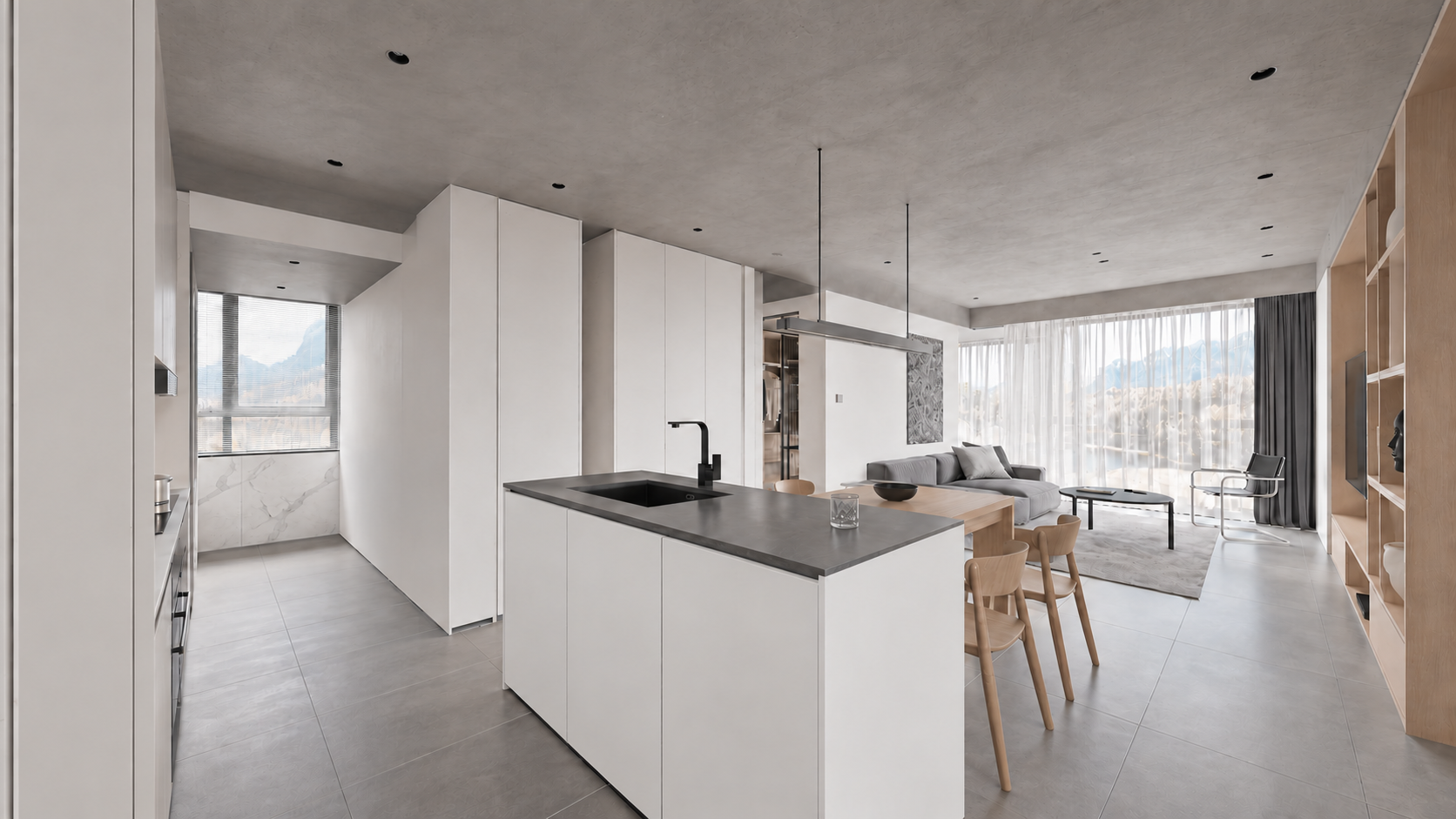
Arquivo: assets/key_01.png. Prompt: prompts/render_01.txt.
Mostrar prompt
Use case: sketch-to-render. Turn image1 into a photoreal WIDE LEVEL architectural interior keyframe, 16:9. Image1 is the geometry and CAMERA source: preserve its exact expansive 108-degree rectilinear view from entrance/kitchen toward dining and living, all frame boundaries, island scale and location, doorway, walls, all furnishings and ceiling. Do not crop, zoom or narrow the angle. All verticals precisely upright, no roll or fisheye. Image2 defines correct kitchen materials; image3 defines the connected living/dining finishes only, never copy these reference camera crops. In viewport image1 the mottled white cabinet texture and black ceiling are display errors: replace with smooth satin white handleless cabinetry and light grey concrete ceiling. Charcoal solid island counter and black faucet, realistic stainless steel details, subtle white marble backsplash, medium grey large stone tiles, pale oak dining table/chairs/TV shelving, grey linen sofa at rear, round black coffee table, chrome cantilever chair, sheer white curtains and charcoal drapes. Consistent soft neutral daylight, physical reflections and detailed restrained textures, premium natural real-estate interior photography. Keep foreground kitchen island, whole central dining area and living room visible together exactly like image1. No added objects, no people, text, border or watermark. Output one 16:9 full-width image.Quadro 2. Sala de jantar
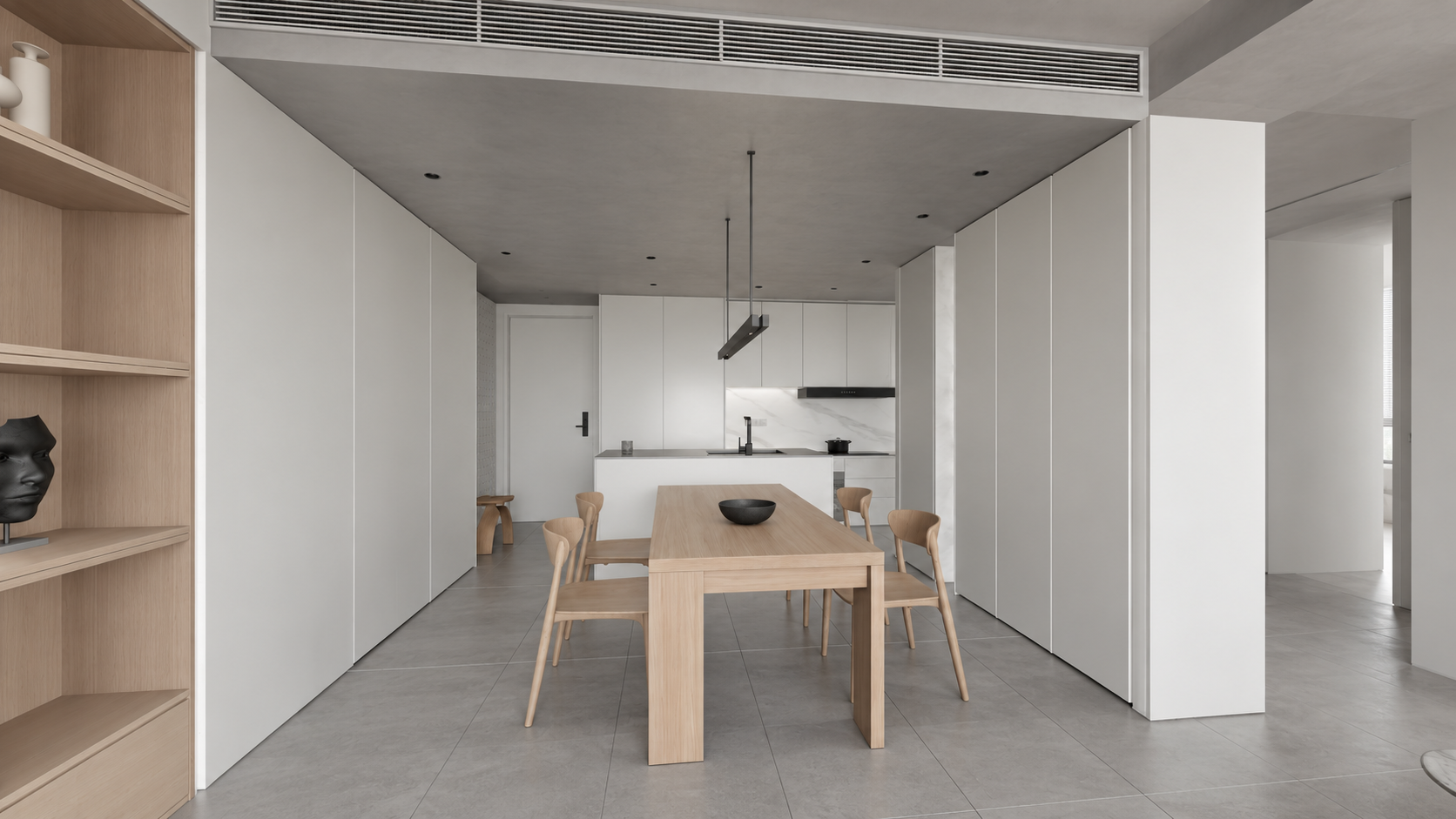
Arquivo: assets/key_02.png. Prompt: prompts/render_02.txt.
Mostrar prompt
Use case: sketch-to-render. Photoreal architectural keyframe for the SAME apartment video. Image 1 EDIT TARGET is a very wide LEVEL 16:9 camera viewport; lock its geometry, room layout, camera position, 108 degree rectilinear perspective, all four crop boundaries and object sizes. Do not zoom in or change the angle. Keep perfectly parallel verticals and level horizon. Image 2 is exact-apartment kitchen MATERIAL reference; image 3 exact-apartment living/dining MATERIAL reference, not camera references. Render viewport image 1 from the living room toward the entire dining table and kitchen behind: pale oak rectangular table with four curved oak chairs and dark shallow bowl, floating minimalist metal pendant; pale oak shelving at left, tall white cabinetry on the right, white kitchen island with dark counter and black faucet at rear, offwhite walls, light grey concrete ceiling with recessed lights and linear HVAC grille, large medium grey matte stone floor tiles. The blotchy viewport material on cabinets is incorrect: cabinetry is smooth satin WHITE as reference2, not marble; marble only on kitchen backsplash. Match soft neutral daylight and restrained white/grey/pale oak palette, realistic texture scale and contact shadows. Preserve wide visible circulation at both sides and generous room context. No new decor, people, typography, borders, watermark. Final landscape 16:9, wide full-room view with straight verticals.Quadro 3. Sala de estar
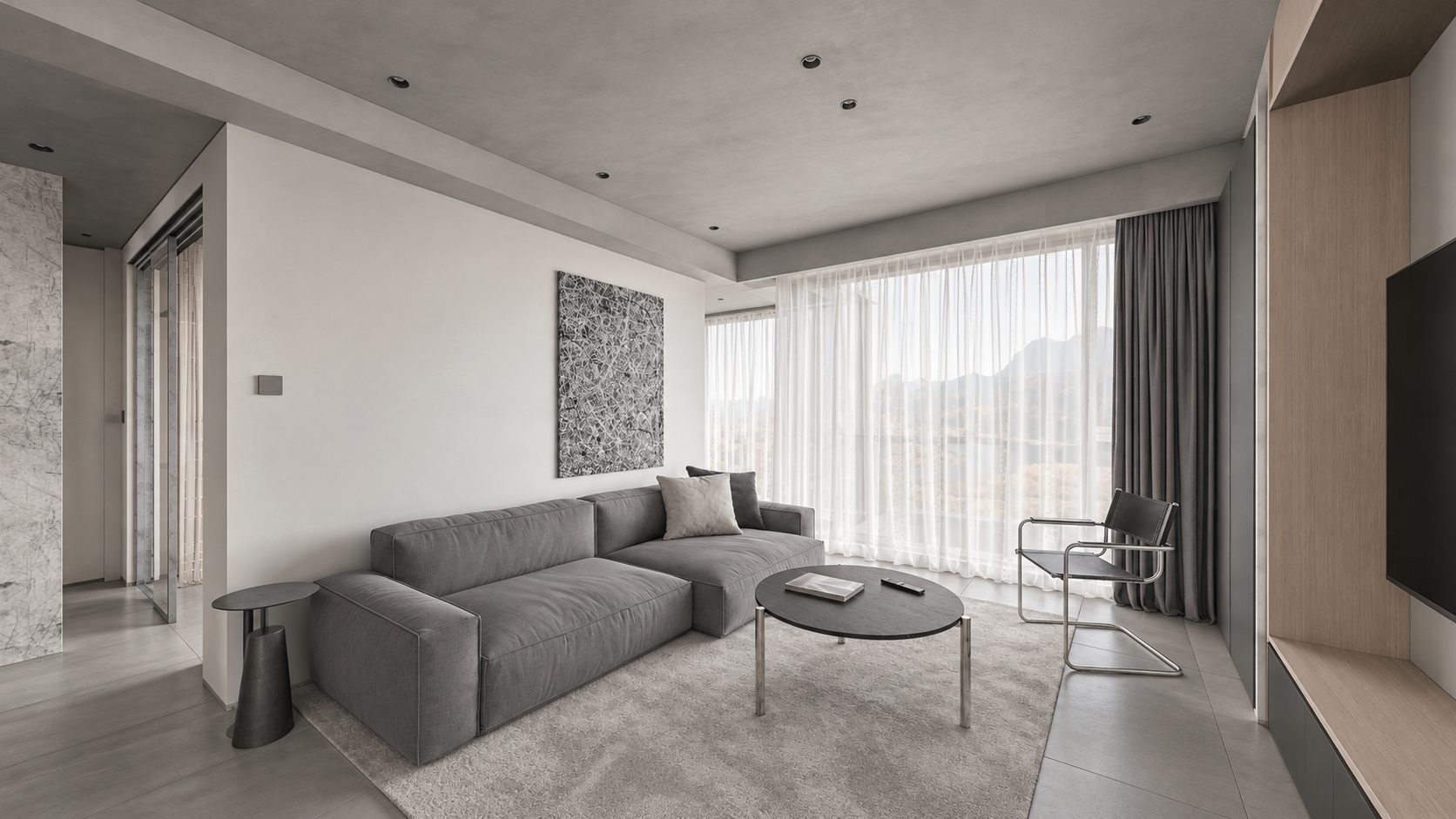
Arquivo: assets/key_03.png. Prompt: prompts/render_03.txt.
Mostrar prompt
Use case: sketch-to-render. Create a photoreal architectural interior keyframe for an apartment walkthrough, landscape 16:9. Image 1 is the EDIT TARGET: a newly approved WIDE LEVEL camera viewport. Strictly preserve its camera position, broad 108-degree rectilinear field of view, all four frame boundaries, geometry, room dimensions, object arrangement, proportions and visible adjacent doorways. Do NOT zoom, crop, recenter or narrow the camera. All vertical architectural lines must stay perfectly vertical, no camera roll, no converging verticals, no fisheye. Image 2 is MATERIAL AND LIGHTING reference of the exact same apartment from another view: never adopt its camera crop. Render the whole wide living room of image 1: entire long grey linen sofa and low side tables, black round coffee table, light grey rug, black/chrome chair, tall sheer white curtains and charcoal drapes, pale oak TV shelving at right, left circulation visible. Soft natural neutral daylight, realistic subtle textures, light grey concrete ceiling rather than black viewport shading, off-white plaster, medium grey large stone floor tiles. Muted white/grey/pale-oak palette. Convert incorrect purple viewport side-table material to matte charcoal like reference. Keep actual furniture designs. Physically plausible soft shadows and reflections, editorial high-end Corona-like interior photograph. No new furniture, people, decorations, lettering, borders or watermark. Preserve the expansive composition of image 1 exactly. Output one landscape 16:9 frame.Quadro 4. Closet de passagem
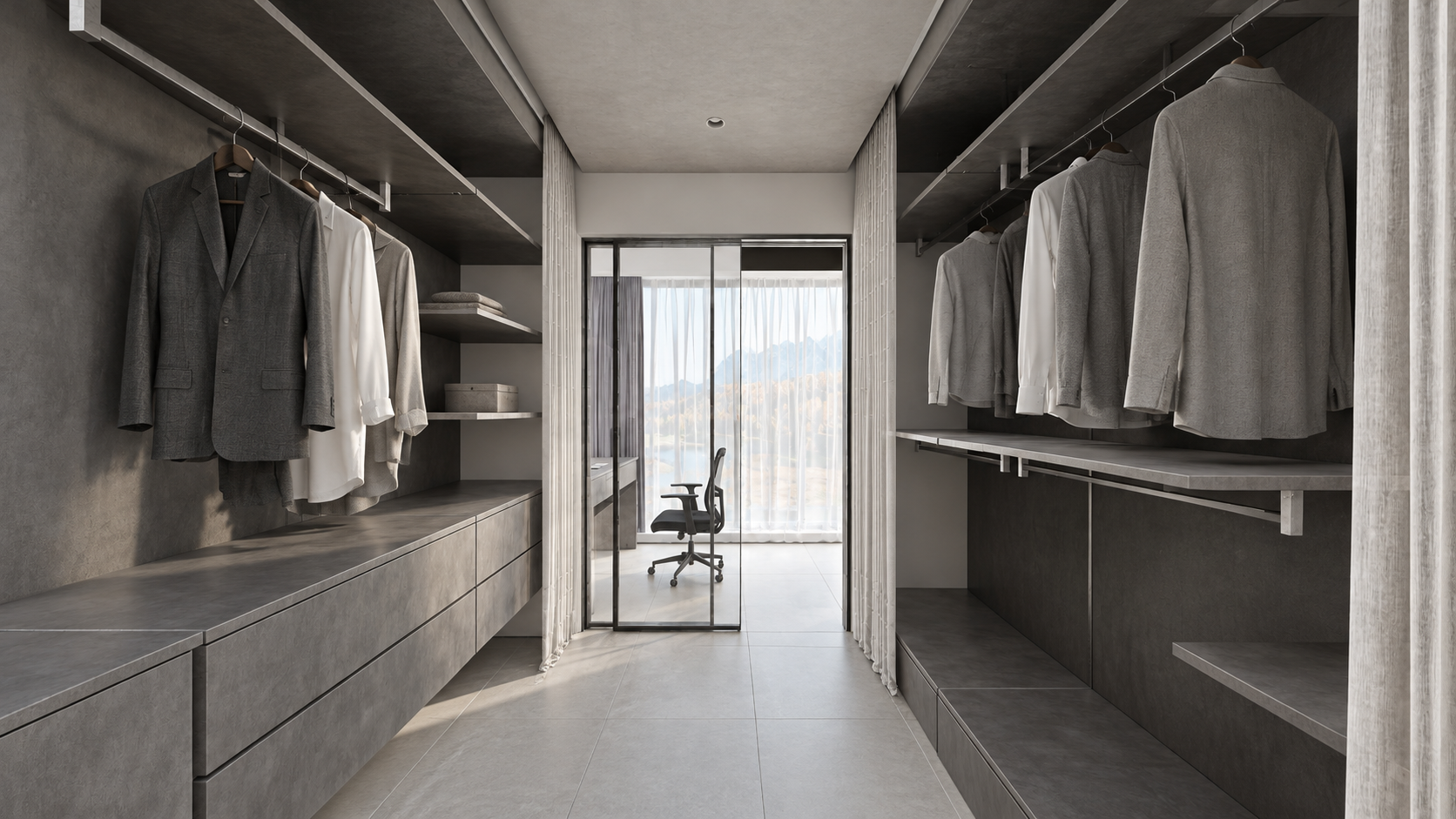
Arquivo: assets/key_04.png. Prompt: prompts/render_04.txt.
Mostrar prompt
Use case: sketch-to-render. Create a photoreal WIDE LEVEL apartment dressing-room keyframe from image1, landscape16:9. Image1 is EDIT TARGET and authoritative geometry/framing: keep camera exactly, very wide rectilinear field of view, all four borders, shelves/drawers and hanging clothes on BOTH sides, entire floor passage, doorway to small study and chair ahead, white curtains and partially open glass sliding panel. Image2 is exact-apartment material/daylight reference, not camera: don't copy its narrower crop. Preserve perfectly straight upright verticals, no pitch/roll/fisheye and no zoom. Replace viewport black shading with realistic charcoal-grey textured storage, grey and white fabric shirts on rails, grey drawer fronts, light grey tiled flooring, pale grey concrete ceiling, clear glass panel with slim black frame at far end, black study chair, soft white curtains and neutral natural daylight from the end window. Match restrained original CGTrader architectural photography, realistic subtle roughness, soft contact shadows and tactile fabrics. Correct noise-like viewport curtain texture to clean fabric without changing curtain shape. No extra objects, people, captions, borders or watermark. Keep full-width broad spatial view, not a close-up.Quadro 5. Área de trabalho após o closet
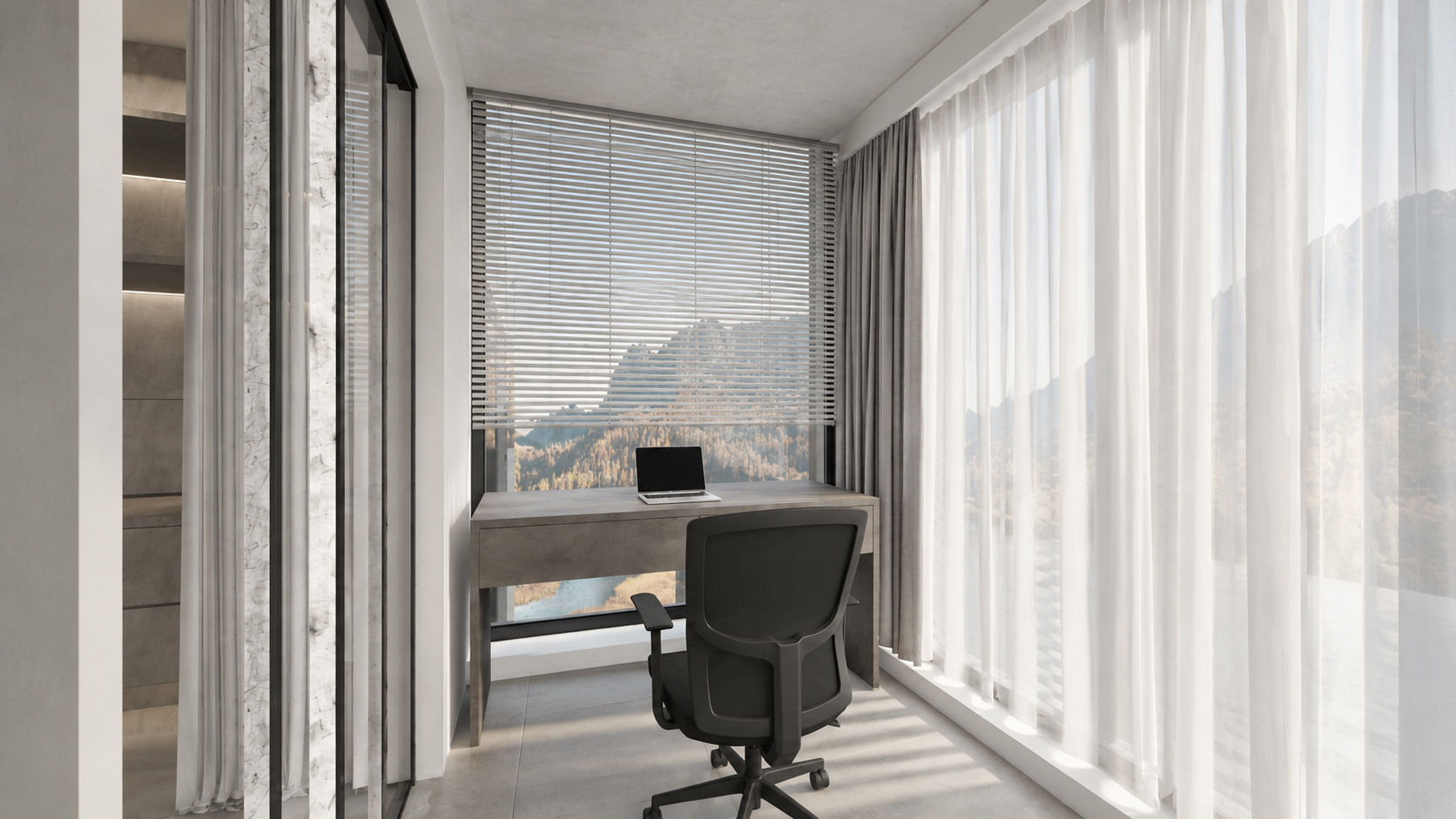
Arquivo: assets/key_05.png. Prompt: prompts/render_05.txt.
Mostrar prompt
Use case: sketch-to-render. Image1 is the EDIT TARGET, a wide LEVEL 16:9 viewport of the small study AFTER the walk-through wardrobe in this apartment. Render this exact view photorealistically: fixed viewpoint, all walls and geometry, very wide rectilinear framing, no crop or zoom, perfectly vertical architectural lines with zero roll or tilt. Image2 is the material/light reference for the connected same-apartment wardrobe, not a framing reference. Show the entire study setup from image1: floating charcoal-grey textured two-drawer desk in front of the far window, thin silver laptop on desk, black ergonomic swivel chair on casters, tall horizontal white venetian blinds above desk, floor-to-ceiling sheer white curtains along right and slim curtain/doorway at left, grey large stone tiled floor, pale grey concrete ceiling, white/plaster window reveals. Material display black strips at ceiling edge are NOT black holes: render continuous actual plaster/grey concrete surfaces and normal thin shadow gaps. Preserve structural boundaries, do not invent an extra room/window/furniture. Gentle soft neutral daylight, subtle shadows, tactile real fabrics, controlled whites, same contemporary minimal white-grey apartment as reference. No people, no extra decor, no text, borders or watermark. Output one wide landscape16:9 real-estate interior photograph suitable as sixth keyframe of a coherent tour.Quadro 6. Banheiro
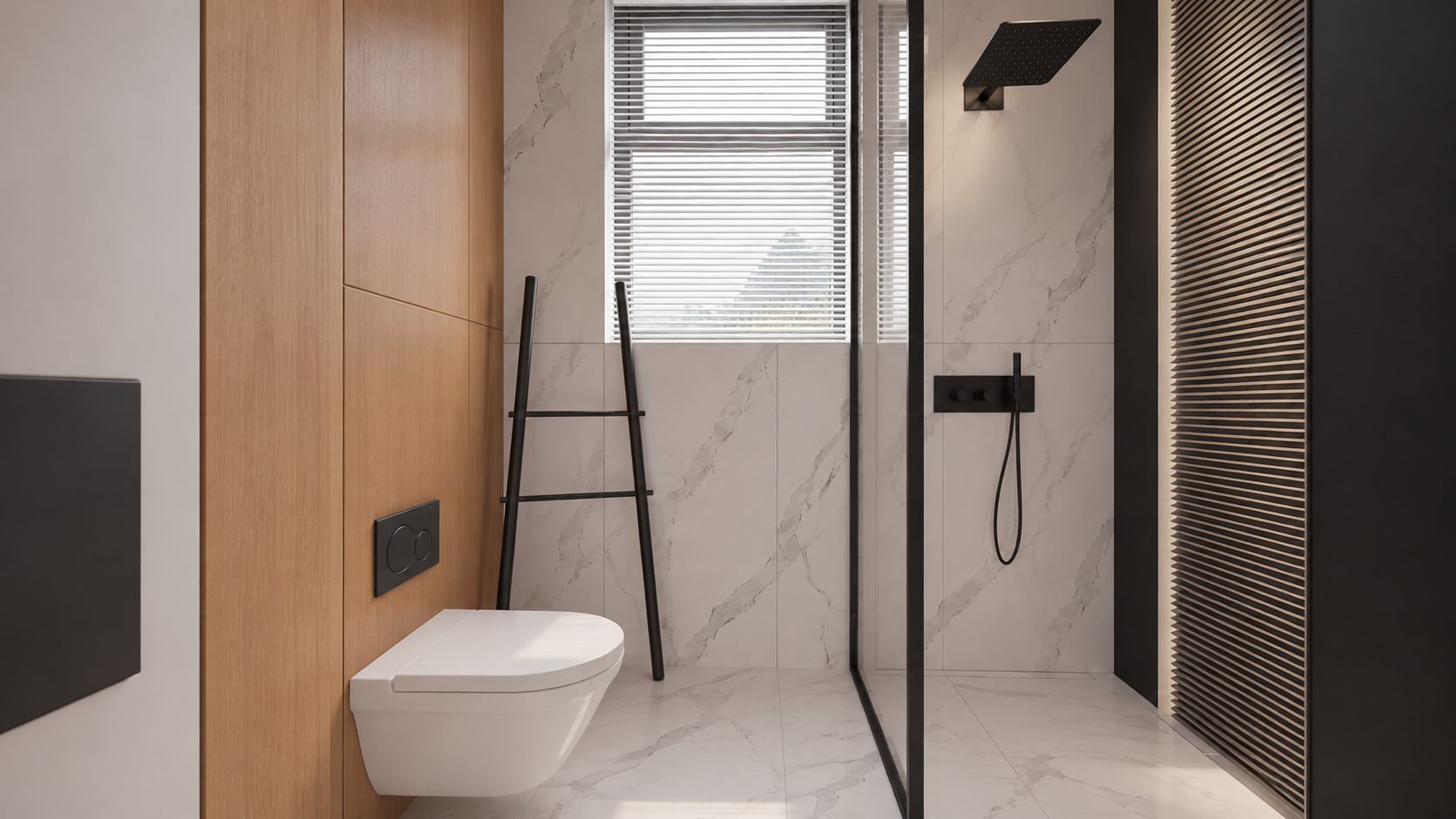
Arquivo: assets/key_06.png. Prompt: prompts/render_06.txt.
Mostrar prompt
Use case: sketch-to-render. Edit image1, a WIDE LEVEL 16:9 bathroom viewport, into a photoreal interior keyframe. Preserve image1 camera, exact wide field of view, room width, entire visible toilet, glass shower enclosure at right, black rainfall shower and handheld shower, tall back window blinds, leaning ladder, left door/jamb and all geometry positions. Image2 is the original exact-bathroom MATERIAL reference, NOT the framing (it is a tight portrait and must NOT be copied). Keep landscape16:9 and all four boundaries from image1, do not zoom. Perfectly straight upright verticals, level horizontal camera, no distortion or fisheye. Materials per image2: the toilet is smooth pure white ceramic NOT marble, left toilet wall warm natural oak panels, flushplate matte black, ladder matte black, back/shower walls and floor subtle white marble with delicate grey veining, clear glass in slim black frame, black shower hardware, white horizontal window blinds. Soft neutral daylight; physically correct gentle highlights and glass transparency. Slatted panel at extreme right remains in place. Make a realistic premium architectural photograph, natural restrained contrast. Preserve actual compact bathroom dimensions, no room enlargement, no new furniture, no people, text, border or watermark. Output a single wide16:9image.Correções locais usadas no exemplo
Depois das seis imagens, corrigimos separadamente o material da cozinha. Uma frente incorreta não exige gerar todo o interior novamente.
Frentes verticais brancas da ilha; mantenha a bancada escura. Anexe a imagem gerada da cozinha como Image 1.
Mostrar prompt
Precise object material edit of image 1. Change ONLY the kitchen island's vertical cabinet fronts and its vertical right end panel from charcoal stone to smooth satin WHITE painted cabinetry, matching the white tall cabinets and the original apartment design. Keep the thin charcoal countertop, black sink and faucet unchanged. Preserve exactly every pixel's composition, wide perspective, level straight verticals, all geometry and details, lighting, colors, furniture, framing and 16:9 aspect ratio. Do not alter anything else. One finished photoreal image.O painel alto à esquerda ficou preto por engano. Image 1 é o render; Image 2, o Viewport corrigido desse painel. Este é um prompt adicional salvo de correção. Os quadros incluídos continuam sendo a versão usada no tutorial, não uma nova geração.
Mostrar prompt
Edit the FIRST image only. It is a finished photorealistic interior render, preserve its exact framing, geometry, furniture, white kitchen island body, dark charcoal countertop and black faucet, oak table and shelving, grey sofa, pale concrete ceiling, daylight and exposure. Fix ONE error: the large full-height vertical cabinet side/front panel at the extreme LEFT edge occupying approximately the leftmost 10% of the frame is wrongly jet black. Make that existing full-height cabinetry panel matte off-white/light warm grey, matching the nearby white cabinetry. Preserve its original seams and straight vertical edges, realistic soft shading. Do not remove the panel, do not change the camera, do not widen or crop. The SECOND image is the corrected 3ds Max viewport showing the proper light colour for this exact left cabinet panel; use it only as colour/geometry evidence for that panel. Keep every other pixel/content as close as possible to the FIRST image. White cabinet panels must read light, never as black holes. Keep intentional black appliances, faucet and charcoal countertop dark. Photoreal high quality, full-bleed 16:9.8. Crie o vídeo no VizTools AI
- Abra o VizTools AI Studio.
- Escolha Seedance 2.5 e um modo compatível com vídeo de movimento e várias imagens. O exemplo usou Motion Transfer. Se esse modo não aparecer, confira os modelos e modos disponíveis; não o substitua silenciosamente por geração com uma única imagem.
- Envie
viewport_motion_10s.mp4ao campo de vídeo de movimento. Confirme que o serviço usa os 10 segundos completos. - Adicione
key_01.pngakey_06.pngcomo referências separadas, nessa ordem. Não use uma folha de contato. - Associe os rótulos reais dos anexos aos ambientes. Eles podem ser diferentes de
@img1a@img6; a cozinha corrigida recebeu@img7na sessão antiga. - Cole o prompt abaixo e substitua os nomes de arquivo pelos rótulos reais, se a interface os usar. O prompt C pode ajudar o Codex nessa tarefa.
- Selecione 10 segundos, 1080p, 16:9, uma variante, sem áudio. Confira o preço exibido e inicie a geração.
- Baixe o MP4 completo e revise todas as transições. As seis imagens orientam a aparência; não são um pedido de apresentação de slides.
Prompt reutilizável do Seedance
Versão portátil preservada do pacote de materiais. Os arquivos são nomeados explicitamente; associe-os aos rótulos da sua interface antes de gerar.
Mostrar prompt
Create a single continuous, photorealistic 10-second architectural walkthrough of the exact apartment shown in the references.

Use viewport_motion_10s.mp4 as the camera-motion and spatial-layout reference. Follow its camera path, viewpoint order, framing and turns. Use the six still images as appearance references for their corresponding spaces:
key_01.png: kitchen with white cabinetry, a grey stone island and an adjoining oak dining table.
key_02.png: dining area looking toward the kitchen.
key_03.png: living room with a grey sofa, round dark coffee table, oak cabinetry and sheer curtains.
key_04.png: walk-through wardrobe with dark shelving and a glazed doorway toward the study.
key_05.png: study desk and office chair beside the corner windows.
key_06.png: bathroom with pale marble, oak panelling, black fixtures and a glass shower enclosure.

The video controls movement and room connectivity; the images control finished materials, lighting and detail. Do not reproduce unrendered viewport shading, overlays, selection outlines or missing-surface artifacts. Do not turn the six references into a slideshow or morph between unrelated compositions.

Move as a steady, smoothly operated camera at natural eye level, with gentle acceleration and deceleration and a slight easing of motion near the reference viewpoints. Preserve the reference route and endpoints. Keep architectural verticals straight, the horizon level and the wide rectilinear perspective stable. No sudden zooms, speed ramps, camera roll, cuts, crossfades, teleportation or passing through walls, furniture or closed glass.

Keep the exact floor plan, room dimensions, openings, furniture positions and architectural proportions. Objects remain fixed and consistent as the camera moves. Doors move only if this happens in the motion reference, using the correct hinges or sliding tracks.

Match the six finished images: soft neutral daylight, consistent exposure and white balance, natural oak, white cabinetry, grey stone and tile, pale marble, realistic fabric and physically plausible glass reflections. Preserve complete walls and ceilings. Distinguish intentional dark wardrobe finishes and black fixtures from missing materials. No black voids or cut-away gaps.

Maintain coherent shadows, reflections, textures and fine detail throughout. No warped geometry, melting furniture, duplicated objects, flicker, added people, text, logos, borders or audio. Full-frame 16:9, 1920x1080, exactly 10 seconds.
Prompt original desta geração
Também incluímos a versão original com tempos e rótulos antigos. Não copie @img7 sem conferir os anexos: era a cozinha corrigida. A palavra depth pertence ao prompt original; o arquivo fornecido é um vídeo do Viewport, não um mapa de profundidade verificado separadamente.
Mostrar prompt
Create ONE continuous TEN-SECOND photorealistic real-estate walkthrough of this exact apartment. Use the attached Motion Transfer depth clip as the precise full 10-second camera trajectory, room connectivity, door motion and framing. Follow the complete reference motion, do not crop its second half. The six finished-image references show the same apartment: @img7 kitchen with white island and white full-height cabinetry; @img2 dining area with oak table; @img3 grey-sofa living room; @img4 walk-through wardrobe; @img5 study desk beyond the wardrobe; @img6 bathroom.

10-second route: 0–1s kitchen, 1–2.25s dining, 2.25–3s living, 3–4.5s enter wardrobe through its opening sliding door, 4.5–5.5s show study desk and window beyond wardrobe, 5.5–6.75s return through wardrobe, 6.75–7.75s bathroom with its door opening, 7.75–10s return to kitchen and settle on starting composition. Preserve gentle ease-in/ease-out at the key views even in this compact tour. One unbroken camera take. Keep the camera level and all verticals straight; wide rectilinear architectural lens, no fisheye, roll, cuts, fades or wall penetration.

Maintain exact room geometry, furniture positions, window design and continuous floor plan. Use the still images for photoreal finish and soft neutral daylight, and use the depth clip ONLY for motion and structure, never as dark surface shading. Kitchen cabinets are white, charcoal stone worktops, oak dining table, realistic reflective glass. Bathroom has white sanitary ceramics, pale marble, warm timber and charcoal shower hardware. Walls and ceiling are solid light surfaces without black holes or cut-away voids. Preserve material continuity across all rooms, detailed fine textures, stable exposure and realistic light/shadow. No extra rooms, people or added furniture; no morphing, bent walls, warped doorways or flickering textures. Full-frame 16:9, 1920×1080. No borders, titles, logos, music or audio.
9. Confira o resultado
- As seis áreas aparecem, incluindo a mesa atrás do closet.
- Planta, portas e móveis correspondem à cena; não surgem ambientes extras.
- A câmera segue um percurso conectado, sem atravessar paredes, virar bruscamente ou saltar.
- As verticais permanecem retas e a perspectiva é consistente nas curvas.
- As frentes brancas continuam brancas. Paredes e teto não têm buracos pretos; os materiais escuros do closet são preservados.
- Texturas, vidro, sombras e exposição não cintilam; os objetos não derretem nem mudam de forma.
- O MP4 dura 10 segundos, com quadro completo em 16:9, sem bordas ou títulos.
Se o defeito já estiver no Viewport, corrija a cena ou o percurso e exporte novamente. Se um render estiver errado, corrija esse quadro e substitua a referência. Se as fontes estiverem corretas, mas o vídeo não, refine as instruções de movimento e as restrições e gere novamente. Restrições textuais reduzem o risco, mas não garantem geometria exata.
Um erro comum é pedir um percurso longo demais para 10 segundos. Encurte o trajeto por ambientes realmente conectados em vez de acelerar a câmera até criar solavancos. Adapte os nomes dos ambientes e o percurso a cada projeto.