
3. Qué vas a crear
Un recorrido interior fluido de 10 segundos por la cocina, el comedor, el salón, el vestidor de paso, la zona de trabajo y el baño. El movimiento de cámara procede de una escena 3D real; seis imágenes terminadas definen los materiales y la iluminación.
El vídeo del Viewport indica por dónde se mueve la cámara; los renders indican cómo debe verse el apartamento. Una descripción de texto no basta para conservar la distribución con fiabilidad.
El ejemplo utiliza Modern Apartment Interior Design. Para tu apartamento, utiliza tu propia escena y sus renders. El enlace identifica la fuente; el modelo 3D de pago no está incluido en las descargas.
4. Qué necesitas
- 3ds Max y una escena del apartamento con texturas. Aquí se usó 3ds Max 2026; el puente debe ser compatible con tu versión.
- Codex con acceso a archivos locales y un puente MCP para 3ds Max configurado. Pedir «conecta MCP» no sustituye la instalación: comprueba primero la conexión.
- Generación de imágenes en Codex/ChatGPT. El ejemplo utilizó la generación integrada; se incluyen los seis fotogramas terminados.
- Una cuenta de VizTools AI con acceso al modelo de vídeo y monedas suficientes. El proceso original usó Seedance 2.5 y Motion Transfer. Antes de generar, comprueba el modo actual, el soporte para seis referencias, la duración y el precio.
- Si tienes renders del apartamento, adjúntalos como referencias de materiales y luz. No deben sustituir el ángulo de cámara del Viewport.
No se ha establecido que ChatGPT Pro sea obligatorio. Necesitas acceso a las funciones utilizadas y límites suficientes. El coste y el tiempo de generación dependen del servicio actual.
5. Prepara la escena y el movimiento
Paso 1. Abre la escena y comprueba la conexión
Abre el proyecto en 3ds Max y pega el prompt A en Codex. Comprueba que identifica la escena correcta. Guarda una copia de trabajo antes de modificarla.
Paso 2. Construye el recorrido
Usa el prompt B. El ejemplo empieza junto a la cocina, muestra la estancia común, atraviesa el vestidor hasta el escritorio y vuelve pasando por la vista del baño hasta el encuadre inicial. El recorrido debe existir en el modelo: no atravieses paredes para conseguir una transición.
Exporta el vídeo de movimiento a 10 segundos, 16:9, 1920×1080 y 30 fps. Si la animación de Max es más larga, adapta el recorrido completo a esa duración; no recortes todo lo que sucede después de los primeros 10 segundos. El ejemplo guardado comprime una animación completa de 20 segundos en un MP4 de 10 segundos.
Usa un objetivo gran angular rectilíneo, sin inclinación lateral y con verticales rectas. Reduce suavemente la velocidad en las vistas clave, sin paradas ni tirones. No deformes la habitación ampliando el ángulo para mostrar más muebles. El FOV de 108° de los prompts originales pertenece a esta cámara, no es obligatorio para cualquier apartamento.
Paso 3. Revisa el Viewport antes de generar
Mira el MP4 completo. Las puertas deben abrirse correctamente y la cámara no debe atravesar muebles ni paredes. Corrige materiales ausentes, paredes cortadas, techos negros y recortes de geometría. Las estanterías oscuras y los accesorios negros reales deben seguir siendo oscuros.
Los frentes de cocina de esta escena son blancos. No los conviertas en beige, negro o mármol por un error de visualización. Comprueba también los acabados del baño: los agujeros negros en las paredes no son un material intencionado.
Paso 4. Guarda seis fotogramas
Extrae cada fotograma de la misma cámara y recorrido. Conserva el encuadre completo 16:9 sin interfaz, contornos de selección ni bordes. Cada render de referencia debe coincidir con la posición de cámara de su fotograma de movimiento.
| N.º | Render terminado | Vista |
|---|---|---|
| 1 | key_01.png | Cocina, isla blanca y vista general del apartamento |
| 2 | key_02.png | Mesa de comedor y conexión con la cocina |
| 3 | key_03.png | Salón, sofá, mesa auxiliar y ventana |
| 4 | key_04.png | Vestidor de paso |
| 5 | key_05.png | Escritorio y zona de trabajo tras el vestidor |
| 6 | key_06.png | Baño y ducha |
6. Prompts para Codex
Los prompts A–C se han traducido de las instrucciones guardadas de este proyecto. Son comandos reutilizables, no una transcripción de la conversación original.
Prompt A. Conexión y comprobación
Mostrar prompt
Conecta el puente MCP de 3ds Max a Codex. Primero comprueba que hay un puente compatible instalado y que la instancia correcta de 3ds Max está disponible. Si ya está conectado, no reinstales nada. Comprueba la respuesta del hilo principal, el nombre de la escena actual, las unidades y las cámaras disponibles. No abras otro archivo ni modifiques la escena durante la comprobación. Si falta el puente, prepara la configuración para mi versión de Max y explica qué debo hacer.Prompt B. Cámaras, vídeo y seis renders
Mostrar prompt
Trabaja con la escena del apartamento abierta. Guarda primero una copia de trabajo. Revisa la distribución, los huecos y los materiales. Crea un recorrido de cámara conectado desde la entrada por el apartamento y de vuelta a la vista inicial. Muestra cocina, comedor, salón, vestidor, escritorio detrás del vestidor y baño solo si existen realmente en el modelo.
Prepara seis fotogramas clave generales y amplios. Cámara a una altura realista, sin inclinación lateral, con verticales rectas y objetivo gran angular rectilíneo sin ojo de pez. No atravieses paredes, muebles ni puertas cerradas. Si una puerta bloquea el recorrido, anima su apertura correctamente, respetando las bisagras y evitando intersecciones.
Recorrido completo de 10 segundos, 16:9, 1920×1080 y 30 fps. Reduce suavemente la velocidad en las vistas clave. Guarda el vídeo del Viewport y seis fotogramas de las mismas cámaras. Genera una imagen fotorrealista de cada fotograma con la generación integrada y mis renders como referencias de materiales y luz. Conserva distribución, muebles, perspectiva y proporciones. Revisa zonas negras en paredes, materiales ausentes y geometría recortada antes de generar. Si el recorrido resulta demasiado rápido en 10 segundos, avísame y propón acortarlo; no aumentes la duración ni el coste por tu cuenta.
Prompt C. Preparar el prompt de vídeo
Mostrar prompt
Redacta un prompt para Seedance 2.5 usando el vídeo de movimiento y las seis imágenes de este apartamento. Primero relaciona las etiquetas reales de referencia del servicio elegido con cocina, comedor, salón, vestidor, escritorio y baño. El vídeo define la trayectoria y la conexión de las habitaciones; las imágenes definen materiales y luz. No inventes nombres de adjuntos ni habitaciones. Requisitos: 10 segundos, 16:9, 1080p; movimiento continuo con desaceleración en vistas clave, verticales rectas, sin deformaciones, morphing ni parpadeos. Devuelve un prompt listo en inglés dentro del límite de la interfaz. No inicies una generación de pago.7. Genera las seis imágenes
Para cada vista, adjunta su Viewport correspondiente como Image 1 y después renders del mismo apartamento como referencias de materiales y luz. Genera cada fotograma por separado. Revisa encuadre, verticales, muebles y frentes blancos antes de continuar.
Los seis prompts siguientes conservan el texto original en inglés y siguen el orden de subida al vídeo. Image 1 es el Viewport de esa vista concreta, no el primer archivo del paquete. Copia el prompt completo.
Usa vistas originales de cocina y estancia común para cocina y comedor; una vista del salón para el salón; el render original del baño para el baño; y una vista del vestidor para vestidor y escritorio. Adapta materiales y objetos a tu escena. Las referencias originales están en la página del modelo; aquí se muestran los seis resultados terminados.
Fotograma 1. Cocina
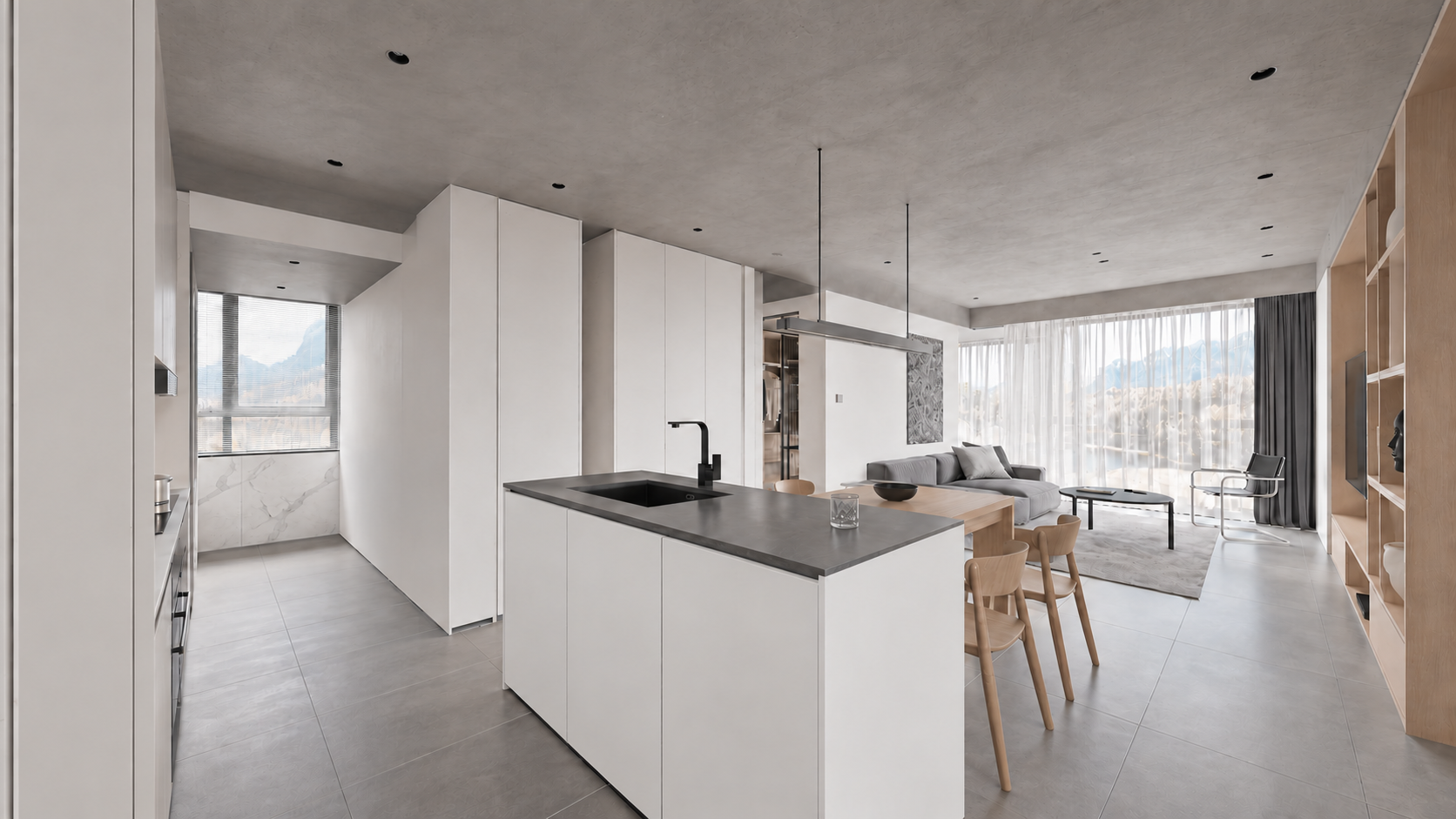
Archivo: assets/key_01.png. Prompt: prompts/render_01.txt.
Mostrar prompt
Use case: sketch-to-render. Turn image1 into a photoreal WIDE LEVEL architectural interior keyframe, 16:9. Image1 is the geometry and CAMERA source: preserve its exact expansive 108-degree rectilinear view from entrance/kitchen toward dining and living, all frame boundaries, island scale and location, doorway, walls, all furnishings and ceiling. Do not crop, zoom or narrow the angle. All verticals precisely upright, no roll or fisheye. Image2 defines correct kitchen materials; image3 defines the connected living/dining finishes only, never copy these reference camera crops. In viewport image1 the mottled white cabinet texture and black ceiling are display errors: replace with smooth satin white handleless cabinetry and light grey concrete ceiling. Charcoal solid island counter and black faucet, realistic stainless steel details, subtle white marble backsplash, medium grey large stone tiles, pale oak dining table/chairs/TV shelving, grey linen sofa at rear, round black coffee table, chrome cantilever chair, sheer white curtains and charcoal drapes. Consistent soft neutral daylight, physical reflections and detailed restrained textures, premium natural real-estate interior photography. Keep foreground kitchen island, whole central dining area and living room visible together exactly like image1. No added objects, no people, text, border or watermark. Output one 16:9 full-width image.Fotograma 2. Comedor
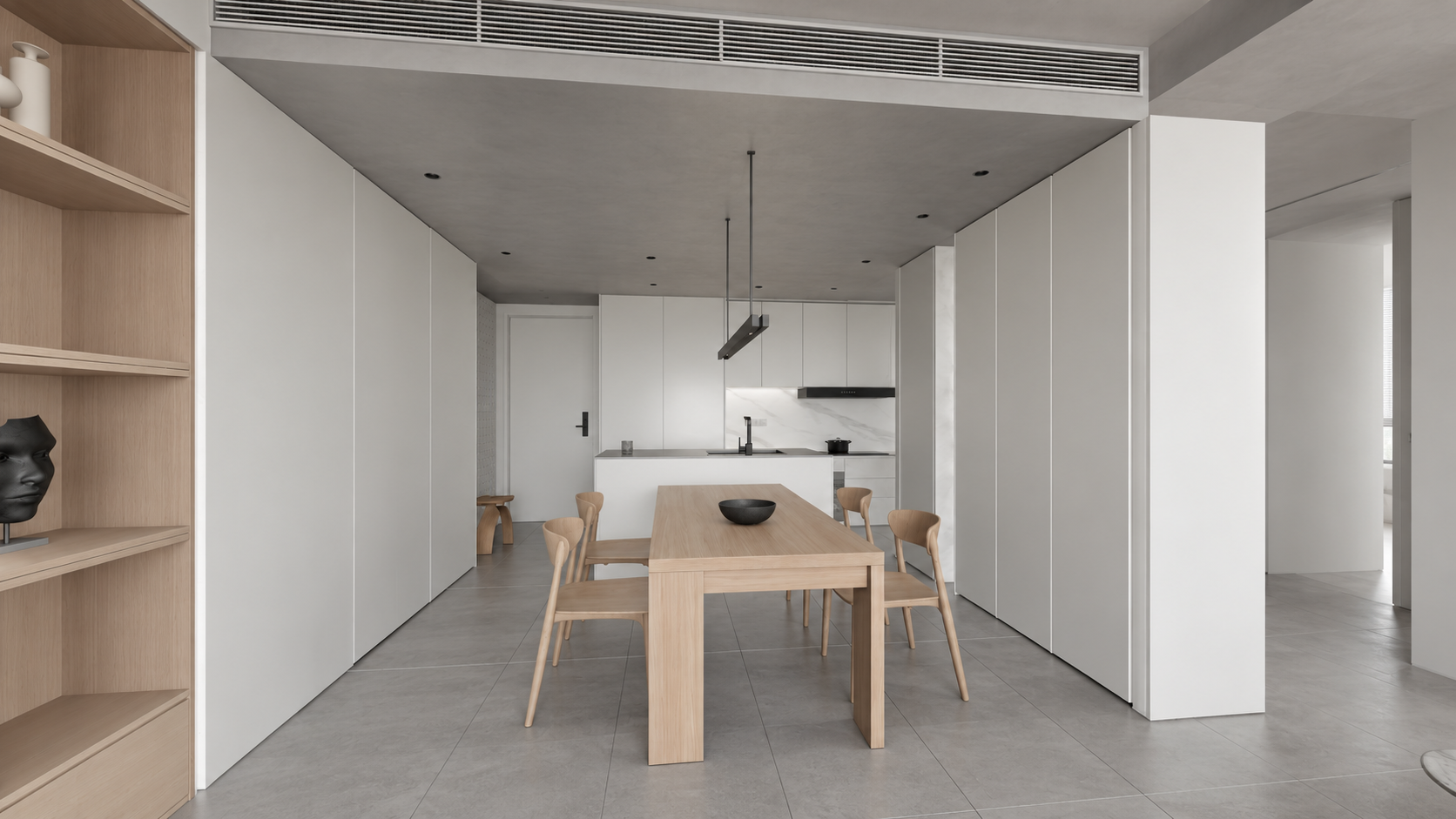
Archivo: assets/key_02.png. Prompt: prompts/render_02.txt.
Mostrar prompt
Use case: sketch-to-render. Photoreal architectural keyframe for the SAME apartment video. Image 1 EDIT TARGET is a very wide LEVEL 16:9 camera viewport; lock its geometry, room layout, camera position, 108 degree rectilinear perspective, all four crop boundaries and object sizes. Do not zoom in or change the angle. Keep perfectly parallel verticals and level horizon. Image 2 is exact-apartment kitchen MATERIAL reference; image 3 exact-apartment living/dining MATERIAL reference, not camera references. Render viewport image 1 from the living room toward the entire dining table and kitchen behind: pale oak rectangular table with four curved oak chairs and dark shallow bowl, floating minimalist metal pendant; pale oak shelving at left, tall white cabinetry on the right, white kitchen island with dark counter and black faucet at rear, offwhite walls, light grey concrete ceiling with recessed lights and linear HVAC grille, large medium grey matte stone floor tiles. The blotchy viewport material on cabinets is incorrect: cabinetry is smooth satin WHITE as reference2, not marble; marble only on kitchen backsplash. Match soft neutral daylight and restrained white/grey/pale oak palette, realistic texture scale and contact shadows. Preserve wide visible circulation at both sides and generous room context. No new decor, people, typography, borders, watermark. Final landscape 16:9, wide full-room view with straight verticals.Fotograma 3. Salón
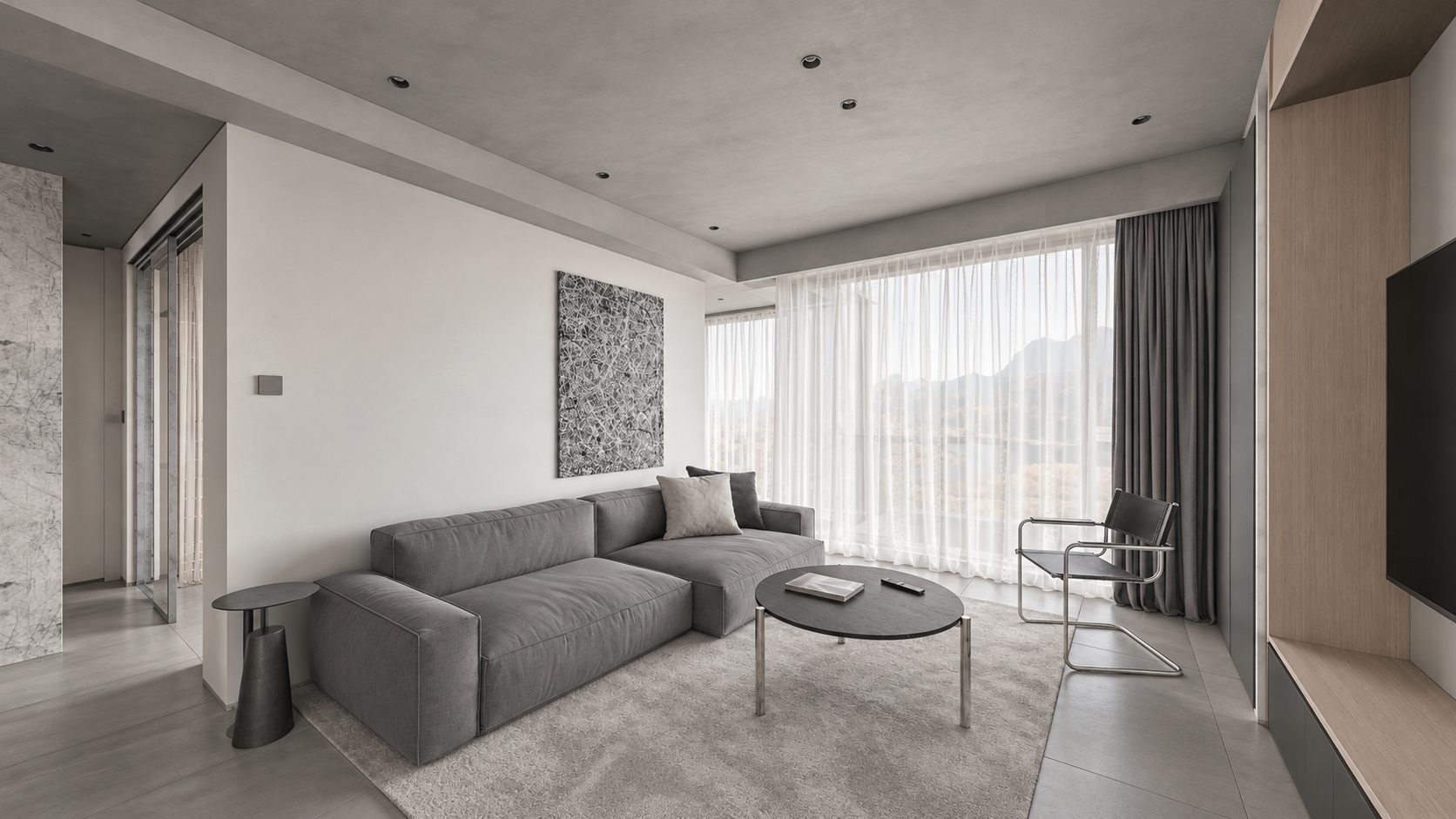
Archivo: assets/key_03.png. Prompt: prompts/render_03.txt.
Mostrar prompt
Use case: sketch-to-render. Create a photoreal architectural interior keyframe for an apartment walkthrough, landscape 16:9. Image 1 is the EDIT TARGET: a newly approved WIDE LEVEL camera viewport. Strictly preserve its camera position, broad 108-degree rectilinear field of view, all four frame boundaries, geometry, room dimensions, object arrangement, proportions and visible adjacent doorways. Do NOT zoom, crop, recenter or narrow the camera. All vertical architectural lines must stay perfectly vertical, no camera roll, no converging verticals, no fisheye. Image 2 is MATERIAL AND LIGHTING reference of the exact same apartment from another view: never adopt its camera crop. Render the whole wide living room of image 1: entire long grey linen sofa and low side tables, black round coffee table, light grey rug, black/chrome chair, tall sheer white curtains and charcoal drapes, pale oak TV shelving at right, left circulation visible. Soft natural neutral daylight, realistic subtle textures, light grey concrete ceiling rather than black viewport shading, off-white plaster, medium grey large stone floor tiles. Muted white/grey/pale-oak palette. Convert incorrect purple viewport side-table material to matte charcoal like reference. Keep actual furniture designs. Physically plausible soft shadows and reflections, editorial high-end Corona-like interior photograph. No new furniture, people, decorations, lettering, borders or watermark. Preserve the expansive composition of image 1 exactly. Output one landscape 16:9 frame.Fotograma 4. Vestidor de paso
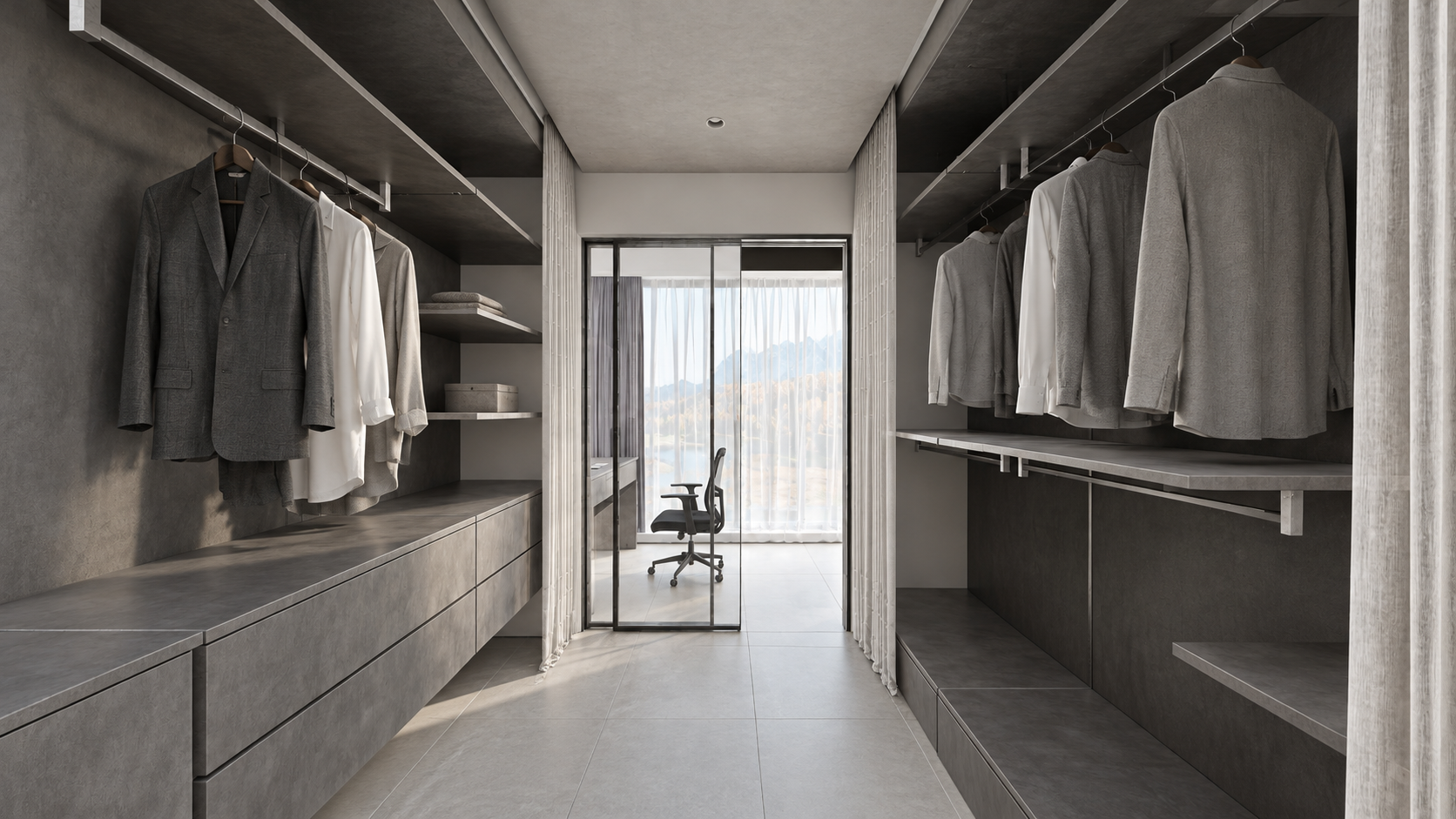
Archivo: assets/key_04.png. Prompt: prompts/render_04.txt.
Mostrar prompt
Use case: sketch-to-render. Create a photoreal WIDE LEVEL apartment dressing-room keyframe from image1, landscape16:9. Image1 is EDIT TARGET and authoritative geometry/framing: keep camera exactly, very wide rectilinear field of view, all four borders, shelves/drawers and hanging clothes on BOTH sides, entire floor passage, doorway to small study and chair ahead, white curtains and partially open glass sliding panel. Image2 is exact-apartment material/daylight reference, not camera: don't copy its narrower crop. Preserve perfectly straight upright verticals, no pitch/roll/fisheye and no zoom. Replace viewport black shading with realistic charcoal-grey textured storage, grey and white fabric shirts on rails, grey drawer fronts, light grey tiled flooring, pale grey concrete ceiling, clear glass panel with slim black frame at far end, black study chair, soft white curtains and neutral natural daylight from the end window. Match restrained original CGTrader architectural photography, realistic subtle roughness, soft contact shadows and tactile fabrics. Correct noise-like viewport curtain texture to clean fabric without changing curtain shape. No extra objects, people, captions, borders or watermark. Keep full-width broad spatial view, not a close-up.Fotograma 5. Zona de trabajo tras el vestidor
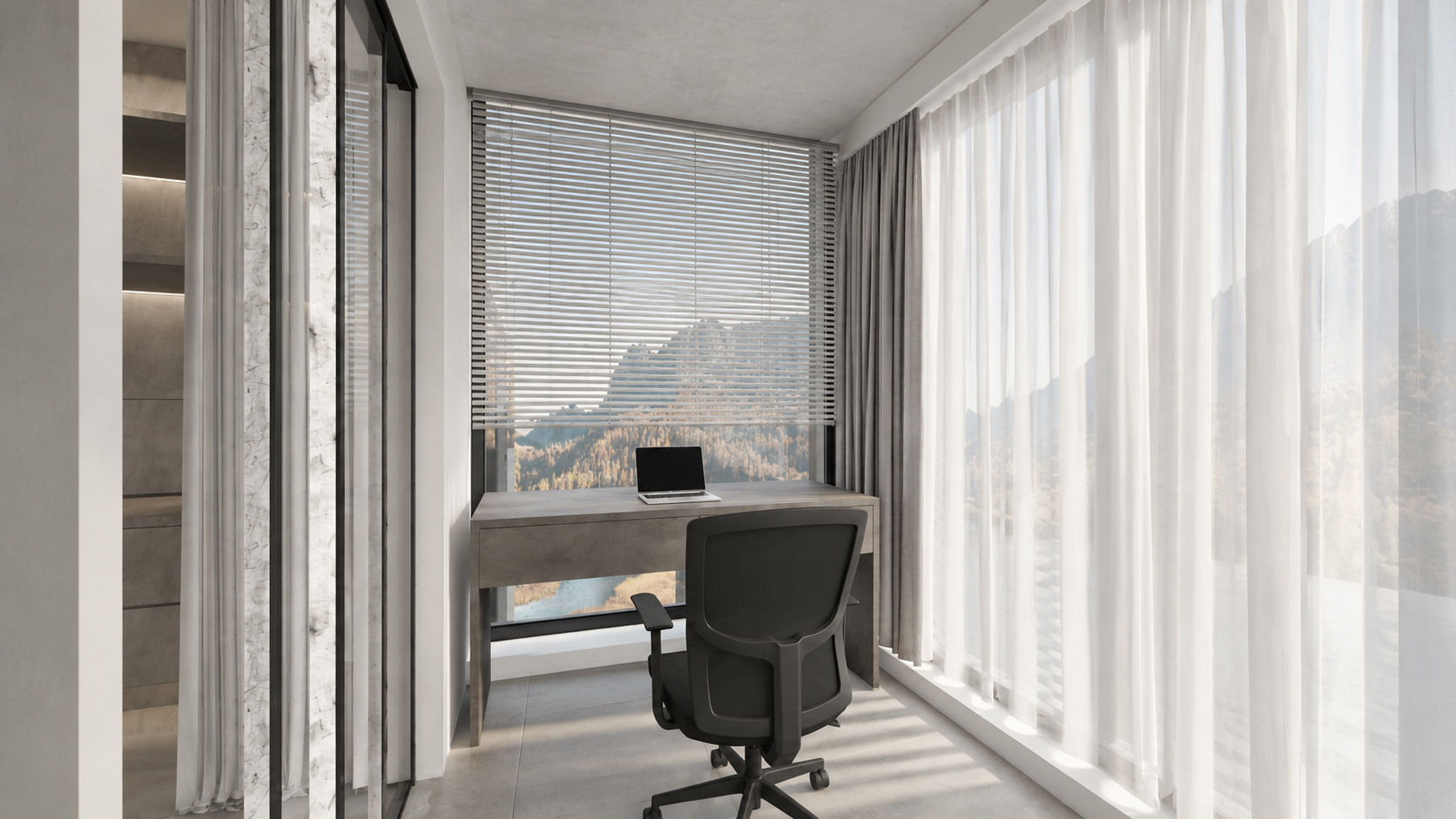
Archivo: assets/key_05.png. Prompt: prompts/render_05.txt.
Mostrar prompt
Use case: sketch-to-render. Image1 is the EDIT TARGET, a wide LEVEL 16:9 viewport of the small study AFTER the walk-through wardrobe in this apartment. Render this exact view photorealistically: fixed viewpoint, all walls and geometry, very wide rectilinear framing, no crop or zoom, perfectly vertical architectural lines with zero roll or tilt. Image2 is the material/light reference for the connected same-apartment wardrobe, not a framing reference. Show the entire study setup from image1: floating charcoal-grey textured two-drawer desk in front of the far window, thin silver laptop on desk, black ergonomic swivel chair on casters, tall horizontal white venetian blinds above desk, floor-to-ceiling sheer white curtains along right and slim curtain/doorway at left, grey large stone tiled floor, pale grey concrete ceiling, white/plaster window reveals. Material display black strips at ceiling edge are NOT black holes: render continuous actual plaster/grey concrete surfaces and normal thin shadow gaps. Preserve structural boundaries, do not invent an extra room/window/furniture. Gentle soft neutral daylight, subtle shadows, tactile real fabrics, controlled whites, same contemporary minimal white-grey apartment as reference. No people, no extra decor, no text, borders or watermark. Output one wide landscape16:9 real-estate interior photograph suitable as sixth keyframe of a coherent tour.Fotograma 6. Baño
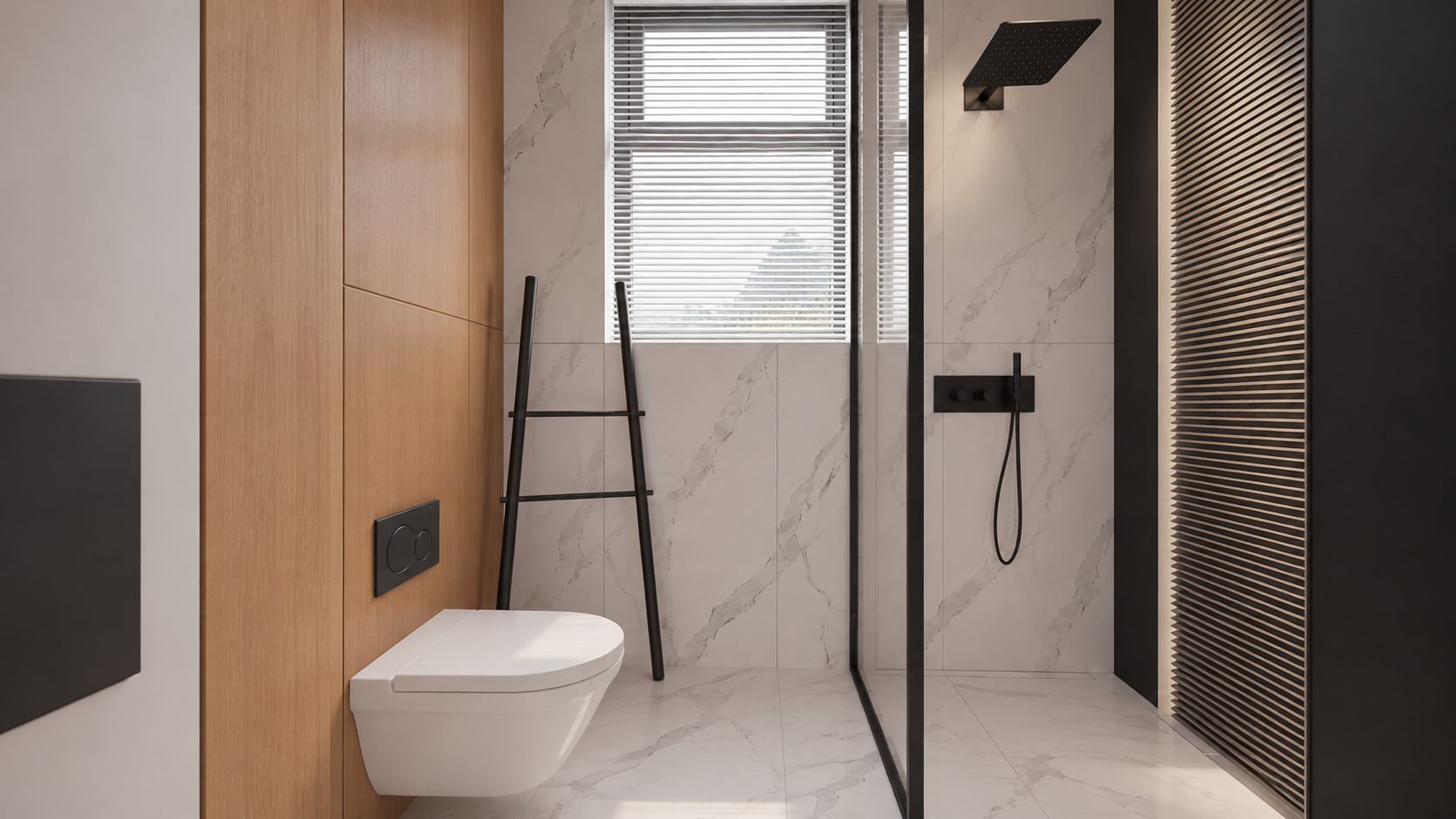
Archivo: assets/key_06.png. Prompt: prompts/render_06.txt.
Mostrar prompt
Use case: sketch-to-render. Edit image1, a WIDE LEVEL 16:9 bathroom viewport, into a photoreal interior keyframe. Preserve image1 camera, exact wide field of view, room width, entire visible toilet, glass shower enclosure at right, black rainfall shower and handheld shower, tall back window blinds, leaning ladder, left door/jamb and all geometry positions. Image2 is the original exact-bathroom MATERIAL reference, NOT the framing (it is a tight portrait and must NOT be copied). Keep landscape16:9 and all four boundaries from image1, do not zoom. Perfectly straight upright verticals, level horizontal camera, no distortion or fisheye. Materials per image2: the toilet is smooth pure white ceramic NOT marble, left toilet wall warm natural oak panels, flushplate matte black, ladder matte black, back/shower walls and floor subtle white marble with delicate grey veining, clear glass in slim black frame, black shower hardware, white horizontal window blinds. Soft neutral daylight; physically correct gentle highlights and glass transparency. Slatted panel at extreme right remains in place. Make a realistic premium architectural photograph, natural restrained contrast. Preserve actual compact bathroom dimensions, no room enlargement, no new furniture, no people, text, border or watermark. Output a single wide16:9image.Correcciones locales del ejemplo
Tras crear las seis imágenes, corregimos por separado el material de la cocina. Un frente incorrecto no exige regenerar todo el interior.
Frentes verticales blancos de la isla; mantener la encimera oscura. Adjunta la imagen generada de la cocina como Image 1.
Mostrar prompt
Precise object material edit of image 1. Change ONLY the kitchen island's vertical cabinet fronts and its vertical right end panel from charcoal stone to smooth satin WHITE painted cabinetry, matching the white tall cabinets and the original apartment design. Keep the thin charcoal countertop, black sink and faucet unchanged. Preserve exactly every pixel's composition, wide perspective, level straight verticals, all geometry and details, lighting, colors, furniture, framing and 16:9 aspect ratio. Do not alter anything else. One finished photoreal image.El panel alto izquierdo se volvió negro por error. Image 1 es el render; Image 2, el Viewport corregido de ese panel. Es un prompt adicional guardado. Los fotogramas incluidos siguen siendo la versión usada en el material del tutorial, no una nueva generación.
Mostrar prompt
Edit the FIRST image only. It is a finished photorealistic interior render, preserve its exact framing, geometry, furniture, white kitchen island body, dark charcoal countertop and black faucet, oak table and shelving, grey sofa, pale concrete ceiling, daylight and exposure. Fix ONE error: the large full-height vertical cabinet side/front panel at the extreme LEFT edge occupying approximately the leftmost 10% of the frame is wrongly jet black. Make that existing full-height cabinetry panel matte off-white/light warm grey, matching the nearby white cabinetry. Preserve its original seams and straight vertical edges, realistic soft shading. Do not remove the panel, do not change the camera, do not widen or crop. The SECOND image is the corrected 3ds Max viewport showing the proper light colour for this exact left cabinet panel; use it only as colour/geometry evidence for that panel. Keep every other pixel/content as close as possible to the FIRST image. White cabinet panels must read light, never as black holes. Keep intentional black appliances, faucet and charcoal countertop dark. Photoreal high quality, full-bleed 16:9.8. Crea el vídeo en VizTools AI
- Abre VizTools AI Studio.
- Elige Seedance 2.5 y un modo que admita vídeo de movimiento y varias imágenes. El ejemplo usó Motion Transfer. Si no aparece, comprueba el modelo y modo disponibles; no lo sustituyas sin más por generación con una sola imagen.
- Sube
viewport_motion_10s.mp4al campo de vídeo de movimiento. Comprueba que utiliza los 10 segundos completos. - Añade
key_01.png…key_06.pngcomo referencias separadas y en ese orden, no como una hoja de contacto. - Relaciona las etiquetas reales de los adjuntos con las habitaciones. Pueden diferir de
@img1…@img6; la cocina corregida recibió@img7en la sesión antigua. - Pega el prompt siguiente y sustituye los nombres de archivo por las etiquetas reales si la interfaz las utiliza. Puedes pedir ayuda a Codex con el prompt C.
- Selecciona 10 segundos, 1080p, 16:9 y una variante, sin audio. Revisa el precio mostrado y genera.
- Descarga el MP4 completo y revisa cada transición. Las seis imágenes orientan el aspecto; no son una petición de montaje de diapositivas.
Prompt reutilizable de Seedance
Versión portable conservada del paquete. Los archivos están nombrados explícitamente; relaciónalos con las etiquetas de tu interfaz antes de generar.
Mostrar prompt
Create a single continuous, photorealistic 10-second architectural walkthrough of the exact apartment shown in the references.

Use viewport_motion_10s.mp4 as the camera-motion and spatial-layout reference. Follow its camera path, viewpoint order, framing and turns. Use the six still images as appearance references for their corresponding spaces:
key_01.png: kitchen with white cabinetry, a grey stone island and an adjoining oak dining table.
key_02.png: dining area looking toward the kitchen.
key_03.png: living room with a grey sofa, round dark coffee table, oak cabinetry and sheer curtains.
key_04.png: walk-through wardrobe with dark shelving and a glazed doorway toward the study.
key_05.png: study desk and office chair beside the corner windows.
key_06.png: bathroom with pale marble, oak panelling, black fixtures and a glass shower enclosure.

The video controls movement and room connectivity; the images control finished materials, lighting and detail. Do not reproduce unrendered viewport shading, overlays, selection outlines or missing-surface artifacts. Do not turn the six references into a slideshow or morph between unrelated compositions.

Move as a steady, smoothly operated camera at natural eye level, with gentle acceleration and deceleration and a slight easing of motion near the reference viewpoints. Preserve the reference route and endpoints. Keep architectural verticals straight, the horizon level and the wide rectilinear perspective stable. No sudden zooms, speed ramps, camera roll, cuts, crossfades, teleportation or passing through walls, furniture or closed glass.

Keep the exact floor plan, room dimensions, openings, furniture positions and architectural proportions. Objects remain fixed and consistent as the camera moves. Doors move only if this happens in the motion reference, using the correct hinges or sliding tracks.

Match the six finished images: soft neutral daylight, consistent exposure and white balance, natural oak, white cabinetry, grey stone and tile, pale marble, realistic fabric and physically plausible glass reflections. Preserve complete walls and ceilings. Distinguish intentional dark wardrobe finishes and black fixtures from missing materials. No black voids or cut-away gaps.

Maintain coherent shadows, reflections, textures and fine detail throughout. No warped geometry, melting furniture, duplicated objects, flicker, added people, text, logos, borders or audio. Full-frame 16:9, 1920x1080, exactly 10 seconds.
Prompt original de esta generación
Incluimos la versión original con tiempos y etiquetas históricas. No copies @img7 sin comprobar los adjuntos: era la cocina corregida. La palabra depth pertenece al prompt original; el archivo adjunto es un vídeo del Viewport, no un mapa de profundidad verificado por separado.
Mostrar prompt
Create ONE continuous TEN-SECOND photorealistic real-estate walkthrough of this exact apartment. Use the attached Motion Transfer depth clip as the precise full 10-second camera trajectory, room connectivity, door motion and framing. Follow the complete reference motion, do not crop its second half. The six finished-image references show the same apartment: @img7 kitchen with white island and white full-height cabinetry; @img2 dining area with oak table; @img3 grey-sofa living room; @img4 walk-through wardrobe; @img5 study desk beyond the wardrobe; @img6 bathroom.

10-second route: 0–1s kitchen, 1–2.25s dining, 2.25–3s living, 3–4.5s enter wardrobe through its opening sliding door, 4.5–5.5s show study desk and window beyond wardrobe, 5.5–6.75s return through wardrobe, 6.75–7.75s bathroom with its door opening, 7.75–10s return to kitchen and settle on starting composition. Preserve gentle ease-in/ease-out at the key views even in this compact tour. One unbroken camera take. Keep the camera level and all verticals straight; wide rectilinear architectural lens, no fisheye, roll, cuts, fades or wall penetration.

Maintain exact room geometry, furniture positions, window design and continuous floor plan. Use the still images for photoreal finish and soft neutral daylight, and use the depth clip ONLY for motion and structure, never as dark surface shading. Kitchen cabinets are white, charcoal stone worktops, oak dining table, realistic reflective glass. Bathroom has white sanitary ceramics, pale marble, warm timber and charcoal shower hardware. Walls and ceiling are solid light surfaces without black holes or cut-away voids. Preserve material continuity across all rooms, detailed fine textures, stable exposure and realistic light/shadow. No extra rooms, people or added furniture; no morphing, bent walls, warped doorways or flickering textures. Full-frame 16:9, 1920×1080. No borders, titles, logos, music or audio.
9. Comprueba el resultado
- Aparecen las seis zonas, incluido el escritorio tras el vestidor.
- Distribución, puertas y muebles coinciden con la escena; no aparecen habitaciones nuevas.
- La cámara sigue un recorrido conectado, sin atravesar paredes ni realizar giros bruscos o saltos.
- Las verticales permanecen rectas y la perspectiva es coherente en los giros.
- Los frentes blancos siguen blancos. No hay agujeros negros en paredes o techos; los materiales oscuros del vestidor se conservan.
- Texturas, cristal, sombras y exposición no parpadean; los objetos no se funden ni cambian de forma.
- El MP4 dura 10 segundos, con encuadre completo 16:9, sin bordes ni títulos.
Si el fallo ya está en el Viewport, corrige la escena o trayectoria y vuelve a exportar. Si falla un render, corrígelo y sustituye su referencia. Si los originales están bien pero el vídeo falla, precisa el movimiento y las restricciones y regenera. Las instrucciones reducen el riesgo, pero no garantizan una geometría exacta.
Un error habitual es pedir un recorrido demasiado largo para 10 segundos. Acorta la ruta por habitaciones conectadas en lugar de acelerar hasta producir tirones. Adapta nombres de habitaciones y recorrido a cada proyecto.