
3. Что мы получим
Плавную интерьерную проходку длиной 10 секунд: кухня, столовая, гостиная, гардеробная, рабочее место и санузел. Движение камеры берём из настоящей 3D-сцены. Шесть готовых изображений задают материалы и освещение.
Видео движения и изображения решают разные задачи: Viewport показывает, куда движется камера; рендеры показывают, как квартира должна выглядеть. Одного текстового описания недостаточно, чтобы надёжно удержать планировку.
Пример построен на сцене Modern Apartment Interior Design. Для своей квартиры используйте собственную сцену и её рендеры. Ссылка на модель — источник примера; архив платной модели в этот пакет не включён.
4. Что понадобится
- Установленный 3ds Max и сцена квартиры с текстурами. В нашем проекте использовался 3ds Max 2026; мост должен соответствовать установленной версии.
- Codex с доступом к локальным файлам и настроенным MCP-мостом для 3ds Max. Одна команда «подключи MCP» не заменяет установленный мост: сначала нужно проверить соединение.
- Доступ к генерации изображений в Codex/ChatGPT. В примере использовалась встроенная генерация изображений; готовые шесть кадров уже приложены.
- Аккаунт VizTools AI с доступом к нужной видеомодели и балансом для генерации. В исходном процессе выбран Seedance 2.5 и Motion Transfer. Название режима, доступность шести референсов, длительность и стоимость следует проверить в текущем интерфейсе перед запуском.
- Если есть готовые рендеры квартиры — приложите их как референсы материалов и света. Они не должны заменять ракурс камеры из Viewport.
Конкретная подписка ChatGPT Pro не является подтверждённым обязательным условием этого урока. Нужен тариф с доступом к используемым функциям и достаточными лимитами. Стоимость и время генерации не фиксируем: они зависят от текущего сервиса.
5. Подготовка сцены и движения
Шаг 1. Откройте сцену и проверьте подключение
Откройте проект в 3ds Max. В Codex вставьте промпт A ниже. Проверьте, что Codex назвал именно нужную сцену. Перед изменениями сохраните рабочую копию.
Шаг 2. Постройте маршрут
Вставьте промпт B. В этом примере маршрут начинается возле кухни, показывает общую комнату, проходит через гардеробную к рабочему столу, возвращается к санузлу и к исходному виду. Маршрут должен существовать в модели: не просите камеру пройти сквозь стену ради красивого перехода.
Выход: 10 секунд, 16:9, 1920×1080, 30 fps для видео движения. Если исходная анимация в Max длиннее, экспортируйте весь маршрут в нужную длительность. Не обрезайте вторую половину исходника до первых 10 секунд. В нашем сохранённом варианте вся 20-секундная анимация была упакована в 10-секундный MP4.
Камера широкоугольная, без крена, вертикали ровные. На ключевых видах — лёгкое замедление, без остановок и рывков. Не расширяйте угол до искажений только ради количества мебели в кадре. В исходных промптах фигурирует FOV 108°: это параметр конкретной камеры примера, а не обязательный угол для любой квартиры.
Шаг 3. Проверьте Viewport до генерации
Посмотрите весь MP4: двери должны открываться корректно, камера не должна пересекать мебель и стены. Исправьте пропавшие материалы, обрезанные стены, чёрный потолок и clipping. Настоящие тёмные полки или чёрная сантехника должны оставаться тёмными.
В исходной сцене кухонные фасады белые. Не заменяйте их бежевым, чёрным или мраморным материалом из-за ошибки отображения. Для санузла также проверьте реальную отделку: чёрные дыры в стенах не являются авторским материалом.
Шаг 4. Сохраните шесть кадров
Каждый кадр берите из той же камеры и того же маршрута. Сохраняйте исходный полный кадр 16:9 без интерфейса, selection outline и рамок. Рендер для референса должен иметь то же положение камеры, что и соответствующий кадр движения.
| № | Файл готового рендера | Что показываем |
|---|---|---|
| 1 | key_01.png | Кухня, белый остров и общий вид на квартиру |
| 2 | key_02.png | Обеденный стол и связь с кухней |
| 3 | key_03.png | Гостиная, диван, столик и окно |
| 4 | key_04.png | Проходная гардеробная |
| 5 | key_05.png | Стол и рабочее место после гардеробной |
| 6 | key_06.png | Санузел и душевая |
6. Промпты для Codex
Промпты A–C ниже взяты из сохранённой инструкции к этой работе. Это готовые команды для повторения процесса, а не стенограмма всех сообщений первоначального чата.
Промпт A. Подключение и проверка
Показать промпт
Подключи MCP 3D Max к Codex. Сначала проверь, установлен ли совместимый мост и доступен ли нужный экземпляр 3ds Max. Если он уже подключён, ничего не переустанавливай. Проверь ответ основного потока, имя текущей сцены, единицы измерения и доступные камеры. Не открывай другой файл и не изменяй сцену во время проверки. Если мост отсутствует, подготовь настройку для моей версии Max и поясни, какие действия нужны с моей стороны.Промпт B. Камеры, видео и шесть рендеров
Показать промпт
Работай с открытой сценой квартиры. Сначала сохрани рабочую копию. Проверь планировку, проёмы и материалы. Создай связный маршрут камеры от входа по квартире с возвращением к исходному виду. Покажи кухню, столовую, гостиную, гардеробную, рабочий стол за гардеробной и санузел — только если эти зоны действительно есть в модели.
Подготовь шесть широких общих ключевых кадров. Камера на реалистичной высоте, без крена, вертикали ровные; широкий прямолинейный объектив без эффекта рыбьего глаза. Не проходи сквозь стены, мебель или закрытые двери. Если дверь мешает маршруту, анимируй её корректное открытие с учётом петель и пересечений.
Длительность всего маршрута 10 секунд, 16:9, 1920×1080, 30 fps. На ключевых видах кратко замедляй движение без рывка. Сохрани видео вьюпорта и шесть кадров из тех же камер. По каждому кадру создай фотореалистичное изображение через встроенную генерацию изображений, используя мои готовые рендеры как референс материалов и света. Сохрани планировку, мебель, перспективу и пропорции. Проверь чёрные участки стен, пропавшие материалы и обрезанную геометрию до генерации. Если маршрут за 10 секунд выходит слишком быстрым, сообщи об этом и предложи сократить путь; длительность и стоимость не увеличивай самовольно.
Промпт C. Запрос промпта для видео
Показать промпт
Составь промпт для Seedance 2.5 по загруженному видео движения и шести изображениям этой квартиры. Сначала сопоставь фактические метки референсов в выбранном сервисе: кухня, столовая, гостиная, гардеробная, рабочий стол, санузел. Видео задаёт траекторию и связность помещений, изображения — материалы и свет. Не выдумывай имена вложений и дополнительные комнаты. Требования: 10 секунд, 16:9, 1080p; непрерывное движение с замедлением у ключевых ракурсов, ровные вертикали, без деформаций, морфинга и мерцания. Верни готовый англоязычный промпт до лимита интерфейса. Не запускай платную генерацию.7. Генерация шести изображений
Для каждого ракурса приложите первым изображением соответствующий Viewport, затем рендеры этой же квартиры для материалов и света. Сгенерируйте каждый кадр отдельно. Проверьте границы кадра, вертикали, мебель и белые фасады перед следующей генерацией.
Ниже — шесть дословно сохранённых рабочих промптов, переставленных в порядок загрузки для видео. Image 1 означает Viewport именно этого ракурса, а не первый файл во всём пакете. Промпты написаны на английском, их можно копировать целиком.
Референсы: для кухни и столовой нужны оригинальные виды кухни и общей комнаты; для гостиной — вид гостиной; для санузла — исходный рендер санузла; для гардеробной и стола — вид гардеробной. Если у вас другая сцена, названия материалов и объектов адаптируйте по ней. Оригинальные референсы примера находятся на странице модели; в галерее урока публикуйте приложенные шесть результатов.
Кадр 1. Кухня
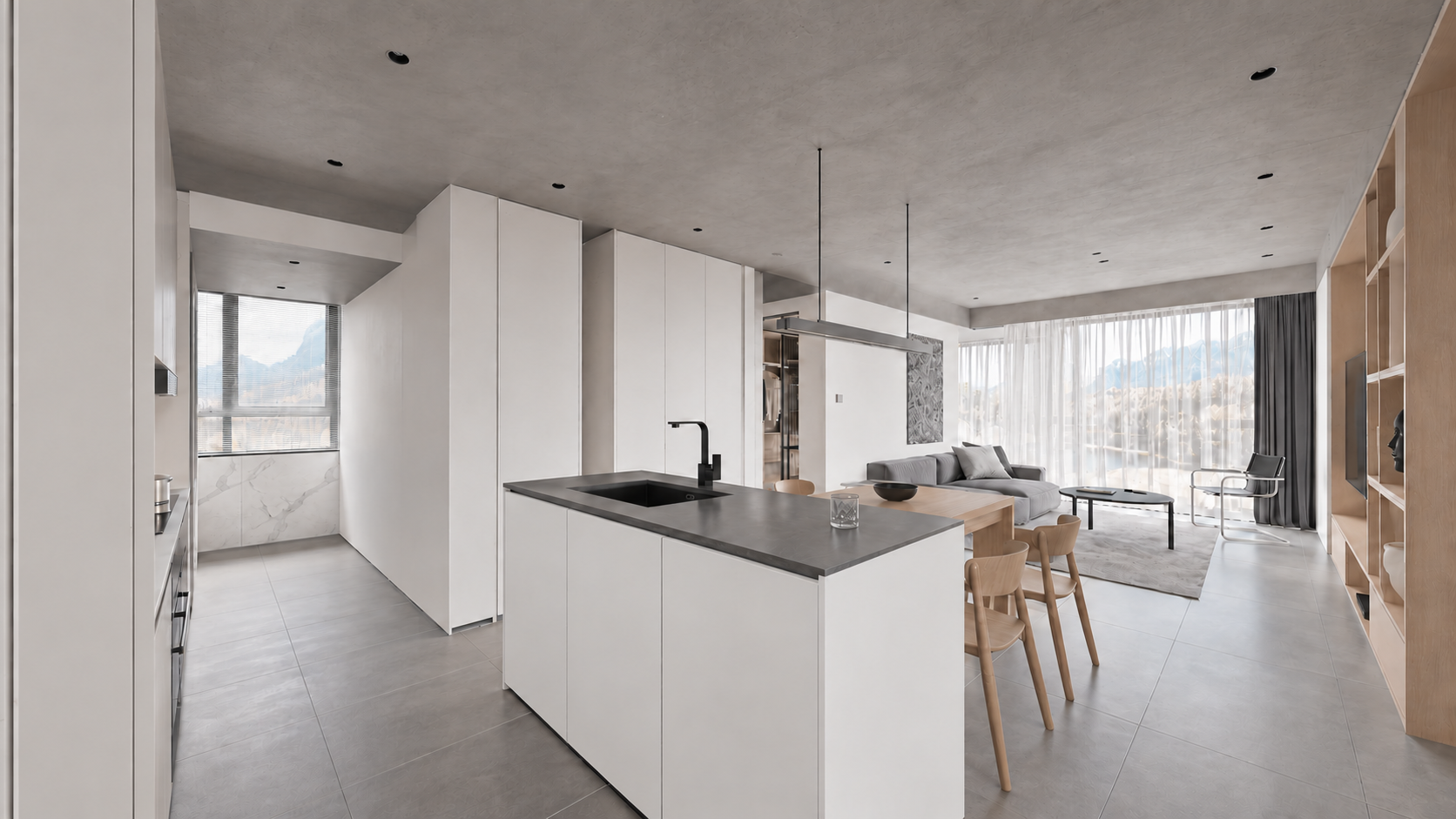
Файл: assets/key_01.png. Промпт: prompts/render_01.txt.
Показать промпт
Use case: sketch-to-render. Turn image1 into a photoreal WIDE LEVEL architectural interior keyframe, 16:9. Image1 is the geometry and CAMERA source: preserve its exact expansive 108-degree rectilinear view from entrance/kitchen toward dining and living, all frame boundaries, island scale and location, doorway, walls, all furnishings and ceiling. Do not crop, zoom or narrow the angle. All verticals precisely upright, no roll or fisheye. Image2 defines correct kitchen materials; image3 defines the connected living/dining finishes only, never copy these reference camera crops. In viewport image1 the mottled white cabinet texture and black ceiling are display errors: replace with smooth satin white handleless cabinetry and light grey concrete ceiling. Charcoal solid island counter and black faucet, realistic stainless steel details, subtle white marble backsplash, medium grey large stone tiles, pale oak dining table/chairs/TV shelving, grey linen sofa at rear, round black coffee table, chrome cantilever chair, sheer white curtains and charcoal drapes. Consistent soft neutral daylight, physical reflections and detailed restrained textures, premium natural real-estate interior photography. Keep foreground kitchen island, whole central dining area and living room visible together exactly like image1. No added objects, no people, text, border or watermark. Output one 16:9 full-width image.Кадр 2. Столовая
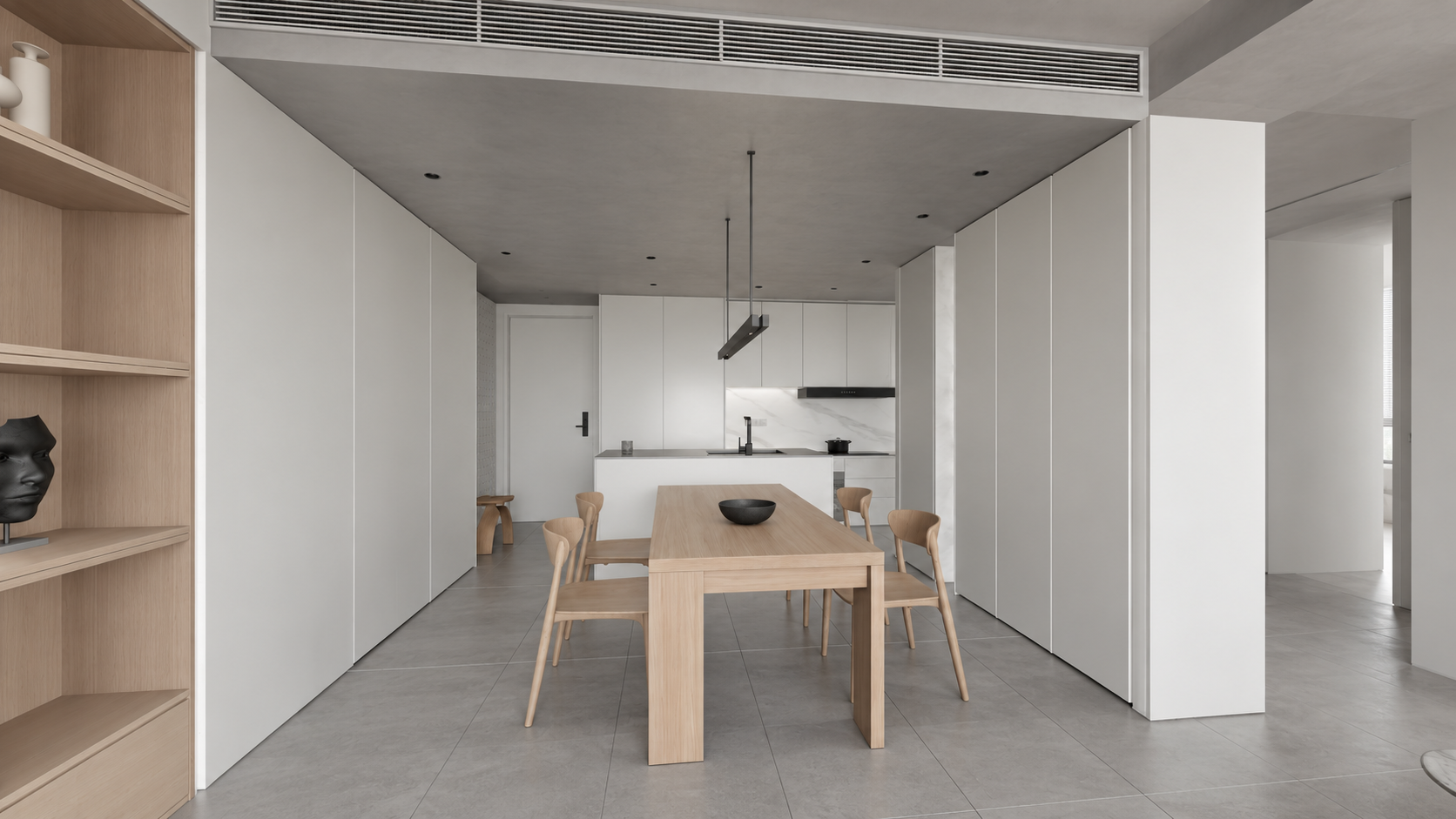
Файл: assets/key_02.png. Промпт: prompts/render_02.txt.
Показать промпт
Use case: sketch-to-render. Photoreal architectural keyframe for the SAME apartment video. Image 1 EDIT TARGET is a very wide LEVEL 16:9 camera viewport; lock its geometry, room layout, camera position, 108 degree rectilinear perspective, all four crop boundaries and object sizes. Do not zoom in or change the angle. Keep perfectly parallel verticals and level horizon. Image 2 is exact-apartment kitchen MATERIAL reference; image 3 exact-apartment living/dining MATERIAL reference, not camera references. Render viewport image 1 from the living room toward the entire dining table and kitchen behind: pale oak rectangular table with four curved oak chairs and dark shallow bowl, floating minimalist metal pendant; pale oak shelving at left, tall white cabinetry on the right, white kitchen island with dark counter and black faucet at rear, offwhite walls, light grey concrete ceiling with recessed lights and linear HVAC grille, large medium grey matte stone floor tiles. The blotchy viewport material on cabinets is incorrect: cabinetry is smooth satin WHITE as reference2, not marble; marble only on kitchen backsplash. Match soft neutral daylight and restrained white/grey/pale oak palette, realistic texture scale and contact shadows. Preserve wide visible circulation at both sides and generous room context. No new decor, people, typography, borders, watermark. Final landscape 16:9, wide full-room view with straight verticals.Кадр 3. Гостиная
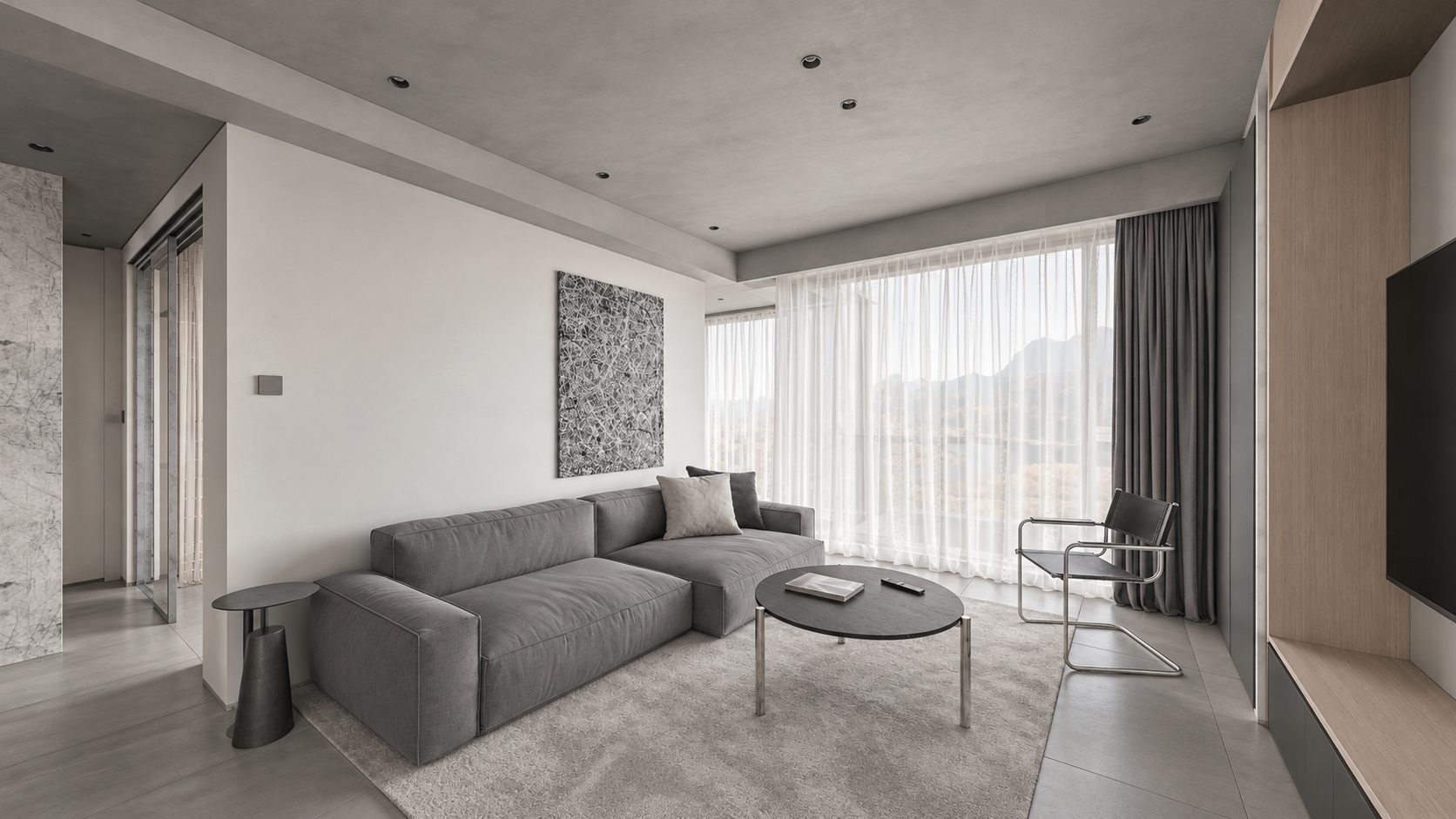
Файл: assets/key_03.png. Промпт: prompts/render_03.txt.
Показать промпт
Use case: sketch-to-render. Create a photoreal architectural interior keyframe for an apartment walkthrough, landscape 16:9. Image 1 is the EDIT TARGET: a newly approved WIDE LEVEL camera viewport. Strictly preserve its camera position, broad 108-degree rectilinear field of view, all four frame boundaries, geometry, room dimensions, object arrangement, proportions and visible adjacent doorways. Do NOT zoom, crop, recenter or narrow the camera. All vertical architectural lines must stay perfectly vertical, no camera roll, no converging verticals, no fisheye. Image 2 is MATERIAL AND LIGHTING reference of the exact same apartment from another view: never adopt its camera crop. Render the whole wide living room of image 1: entire long grey linen sofa and low side tables, black round coffee table, light grey rug, black/chrome chair, tall sheer white curtains and charcoal drapes, pale oak TV shelving at right, left circulation visible. Soft natural neutral daylight, realistic subtle textures, light grey concrete ceiling rather than black viewport shading, off-white plaster, medium grey large stone floor tiles. Muted white/grey/pale-oak palette. Convert incorrect purple viewport side-table material to matte charcoal like reference. Keep actual furniture designs. Physically plausible soft shadows and reflections, editorial high-end Corona-like interior photograph. No new furniture, people, decorations, lettering, borders or watermark. Preserve the expansive composition of image 1 exactly. Output one landscape 16:9 frame.Кадр 4. Гардеробная
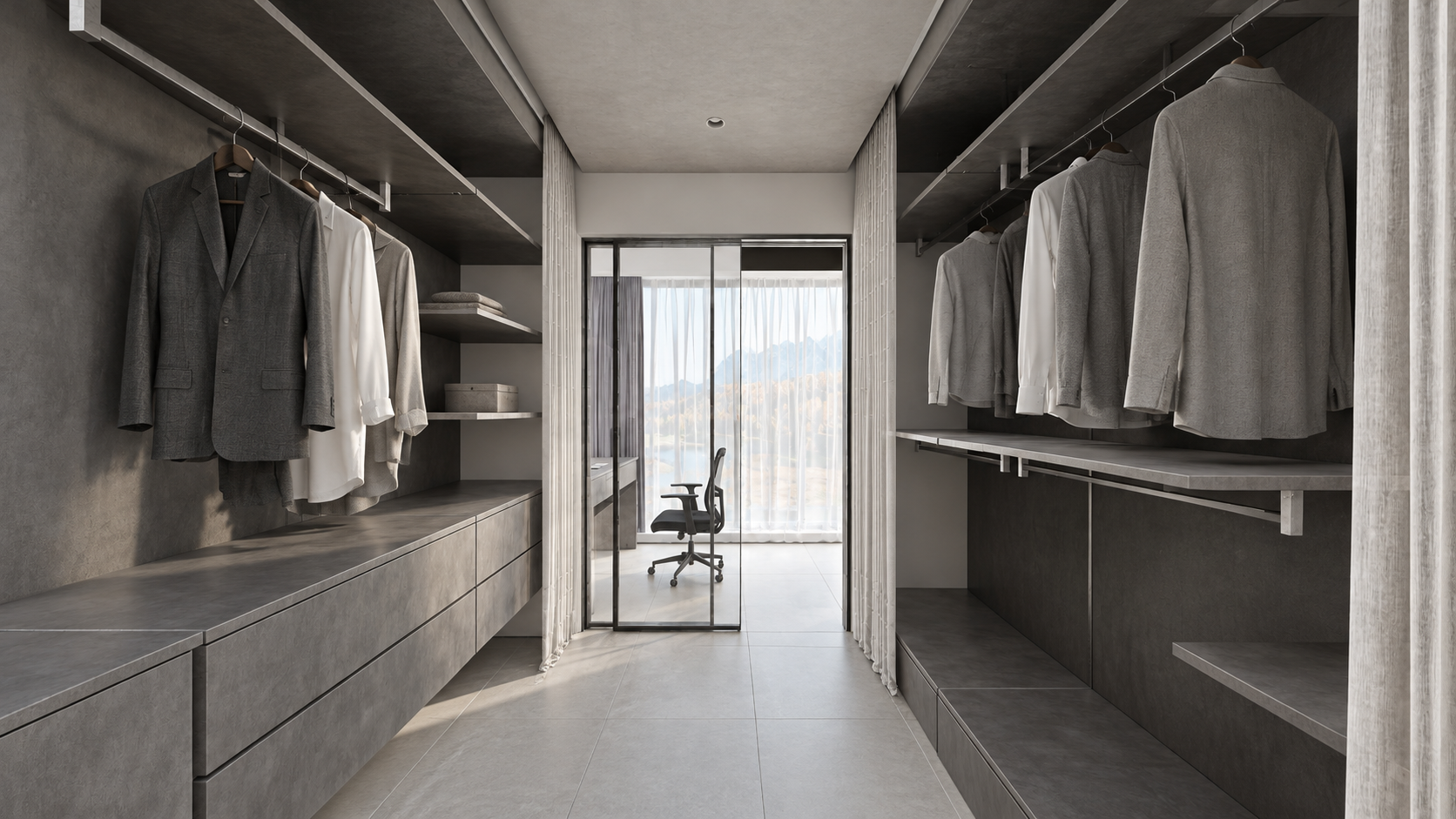
Файл: assets/key_04.png. Промпт: prompts/render_04.txt.
Показать промпт
Use case: sketch-to-render. Create a photoreal WIDE LEVEL apartment dressing-room keyframe from image1, landscape16:9. Image1 is EDIT TARGET and authoritative geometry/framing: keep camera exactly, very wide rectilinear field of view, all four borders, shelves/drawers and hanging clothes on BOTH sides, entire floor passage, doorway to small study and chair ahead, white curtains and partially open glass sliding panel. Image2 is exact-apartment material/daylight reference, not camera: don't copy its narrower crop. Preserve perfectly straight upright verticals, no pitch/roll/fisheye and no zoom. Replace viewport black shading with realistic charcoal-grey textured storage, grey and white fabric shirts on rails, grey drawer fronts, light grey tiled flooring, pale grey concrete ceiling, clear glass panel with slim black frame at far end, black study chair, soft white curtains and neutral natural daylight from the end window. Match restrained original CGTrader architectural photography, realistic subtle roughness, soft contact shadows and tactile fabrics. Correct noise-like viewport curtain texture to clean fabric without changing curtain shape. No extra objects, people, captions, borders or watermark. Keep full-width broad spatial view, not a close-up.Кадр 5. Рабочая зона за гардеробной
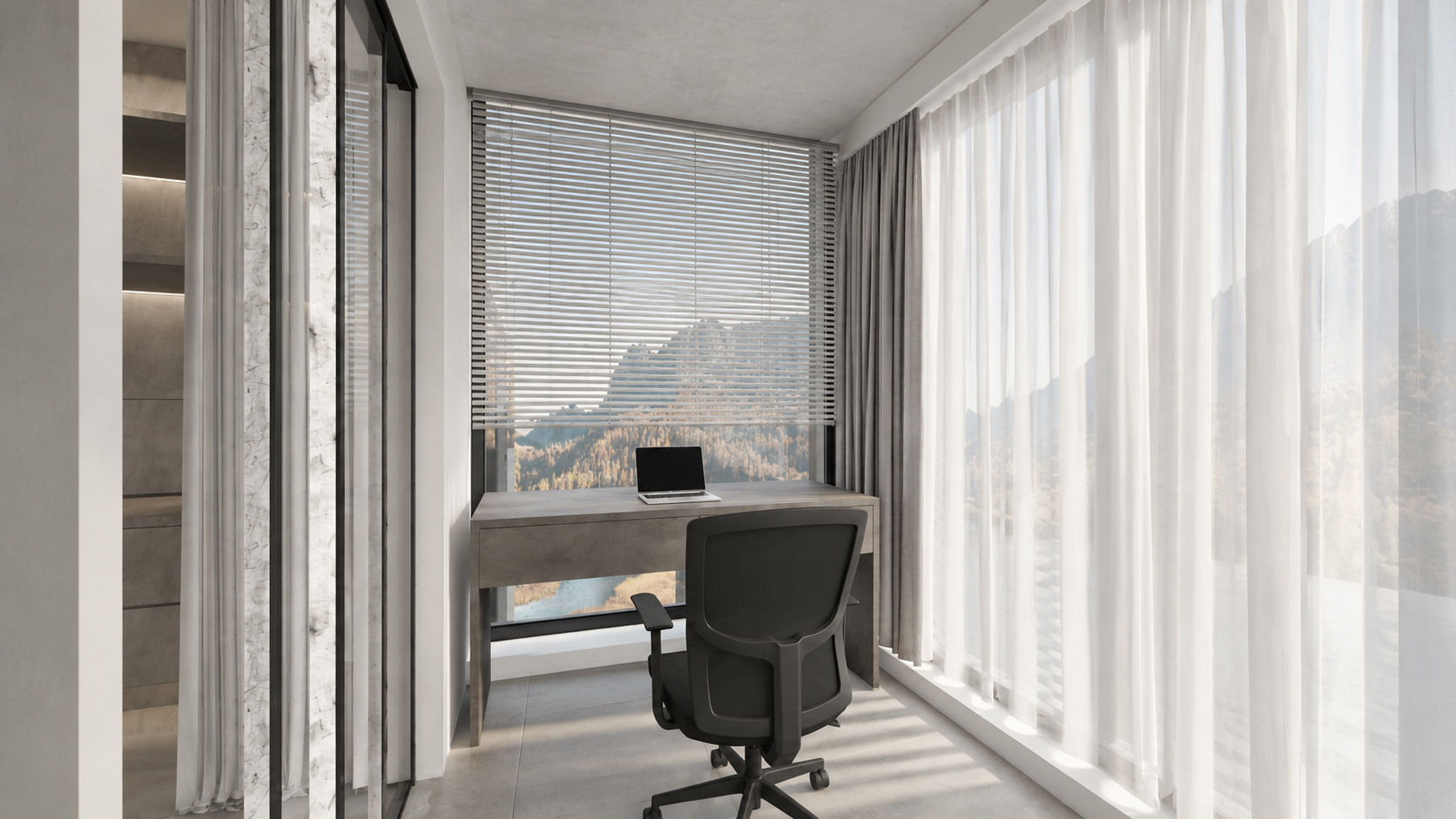
Файл: assets/key_05.png. Промпт: prompts/render_05.txt.
Показать промпт
Use case: sketch-to-render. Image1 is the EDIT TARGET, a wide LEVEL 16:9 viewport of the small study AFTER the walk-through wardrobe in this apartment. Render this exact view photorealistically: fixed viewpoint, all walls and geometry, very wide rectilinear framing, no crop or zoom, perfectly vertical architectural lines with zero roll or tilt. Image2 is the material/light reference for the connected same-apartment wardrobe, not a framing reference. Show the entire study setup from image1: floating charcoal-grey textured two-drawer desk in front of the far window, thin silver laptop on desk, black ergonomic swivel chair on casters, tall horizontal white venetian blinds above desk, floor-to-ceiling sheer white curtains along right and slim curtain/doorway at left, grey large stone tiled floor, pale grey concrete ceiling, white/plaster window reveals. Material display black strips at ceiling edge are NOT black holes: render continuous actual plaster/grey concrete surfaces and normal thin shadow gaps. Preserve structural boundaries, do not invent an extra room/window/furniture. Gentle soft neutral daylight, subtle shadows, tactile real fabrics, controlled whites, same contemporary minimal white-grey apartment as reference. No people, no extra decor, no text, borders or watermark. Output one wide landscape16:9 real-estate interior photograph suitable as sixth keyframe of a coherent tour.Кадр 6. Санузел
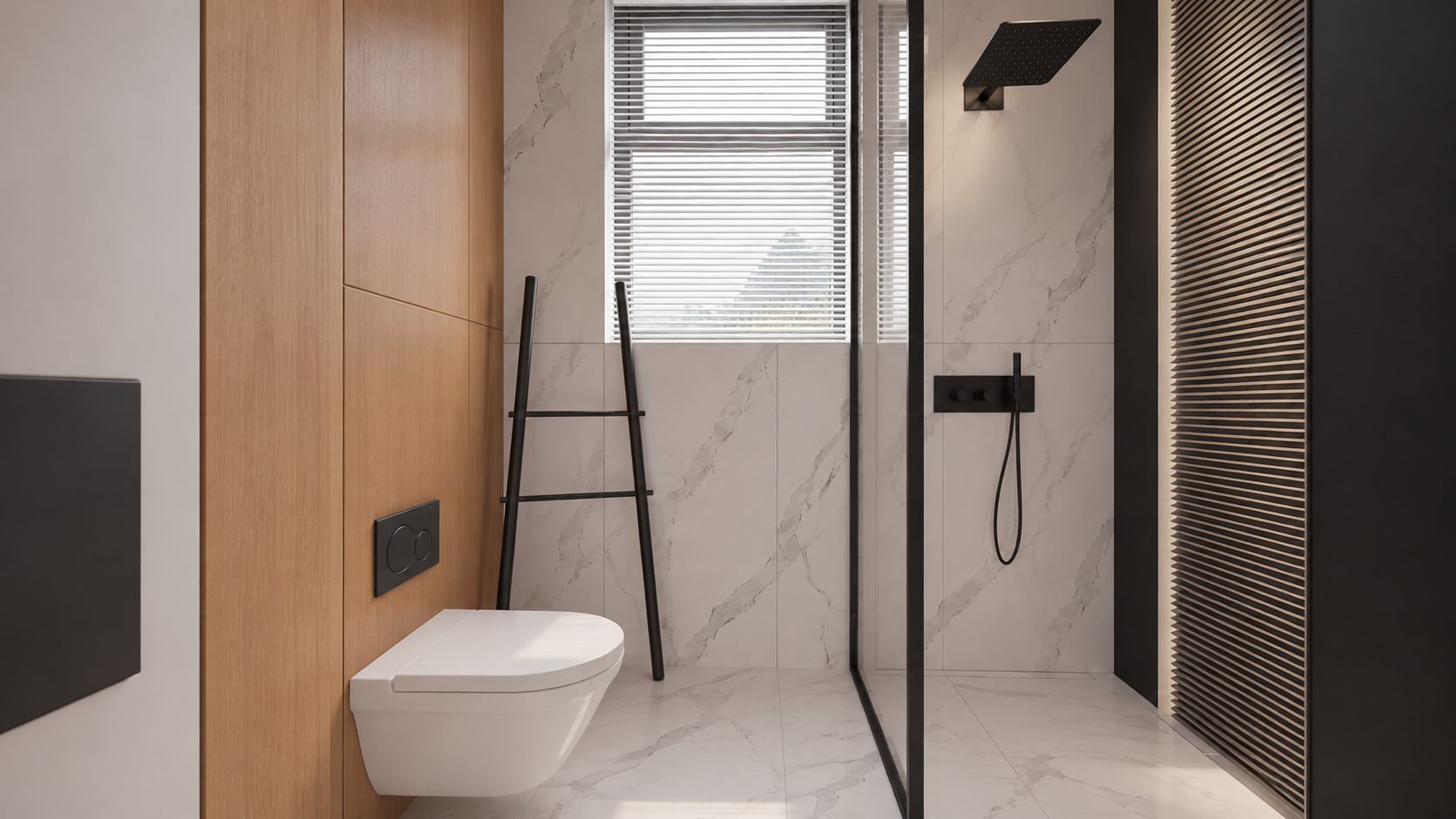
Файл: assets/key_06.png. Промпт: prompts/render_06.txt.
Показать промпт
Use case: sketch-to-render. Edit image1, a WIDE LEVEL 16:9 bathroom viewport, into a photoreal interior keyframe. Preserve image1 camera, exact wide field of view, room width, entire visible toilet, glass shower enclosure at right, black rainfall shower and handheld shower, tall back window blinds, leaning ladder, left door/jamb and all geometry positions. Image2 is the original exact-bathroom MATERIAL reference, NOT the framing (it is a tight portrait and must NOT be copied). Keep landscape16:9 and all four boundaries from image1, do not zoom. Perfectly straight upright verticals, level horizontal camera, no distortion or fisheye. Materials per image2: the toilet is smooth pure white ceramic NOT marble, left toilet wall warm natural oak panels, flushplate matte black, ladder matte black, back/shower walls and floor subtle white marble with delicate grey veining, clear glass in slim black frame, black shower hardware, white horizontal window blinds. Soft neutral daylight; physically correct gentle highlights and glass transparency. Slatted panel at extreme right remains in place. Make a realistic premium architectural photograph, natural restrained contrast. Preserve actual compact bathroom dimensions, no room enlargement, no new furniture, no people, text, border or watermark. Output a single wide16:9image.Точечные исправления, которые понадобились в примере
Сначала получили шесть изображений, затем отдельно исправили неверный материал кухни. Не нужно перегенерировать весь интерьер ради одного фасада.
Белые вертикальные фасады острова; тёмная столешница остаётся. Приложите получившееся изображение кухни как Image 1.
Показать промпт
Precise object material edit of image 1. Change ONLY the kitchen island's vertical cabinet fronts and its vertical right end panel from charcoal stone to smooth satin WHITE painted cabinetry, matching the white tall cabinets and the original apartment design. Keep the thin charcoal countertop, black sink and faucet unchanged. Preserve exactly every pixel's composition, wide perspective, level straight verticals, all geometry and details, lighting, colors, furniture, framing and 16:9 aspect ratio. Do not alter anything else. One finished photoreal image.Левая высокая панель ошибочно стала чёрной. Image 1 — рендер, Image 2 — исправленный Viewport этой панели. Это дополнительный сохранённый промпт исправления; выбранный пакет ключевых соответствует версии, использованной в материалах урока, и не переименовывается в новую генерацию.
Показать промпт
Edit the FIRST image only. It is a finished photorealistic interior render, preserve its exact framing, geometry, furniture, white kitchen island body, dark charcoal countertop and black faucet, oak table and shelving, grey sofa, pale concrete ceiling, daylight and exposure. Fix ONE error: the large full-height vertical cabinet side/front panel at the extreme LEFT edge occupying approximately the leftmost 10% of the frame is wrongly jet black. Make that existing full-height cabinetry panel matte off-white/light warm grey, matching the nearby white cabinetry. Preserve its original seams and straight vertical edges, realistic soft shading. Do not remove the panel, do not change the camera, do not widen or crop. The SECOND image is the corrected 3ds Max viewport showing the proper light colour for this exact left cabinet panel; use it only as colour/geometry evidence for that panel. Keep every other pixel/content as close as possible to the FIRST image. White cabinet panels must read light, never as black holes. Keep intentional black appliances, faucet and charcoal countertop dark. Photoreal high quality, full-bleed 16:9.8. Собираем видео в VizTools AI
- Откройте студию VizTools AI.
- Выберите Seedance 2.5 и режим с поддержкой видео движения и нескольких изображений. В процессе примера этот ввод использовался как Motion Transfer. Если нужного режима нет в вашем интерфейсе, не заменяйте его молча режимом с одним изображением: сначала проверьте доступную модель/режим.
- Загрузите
viewport_motion_10s.mp4в поле видео движения. Убедитесь, что сервис берёт полные 10 секунд. - Добавьте
key_01.png…key_06.pngкак изображения-референсы в указанном порядке. Не загружайте контактный лист вместо шести отдельных файлов. - Запишите фактические метки вложений из интерфейса и сопоставьте их с комнатами. Метки могут отличаться от
@img1…@img6; в старой сессии исправленная кухня получила@img7. - Вставьте промпт ниже, заменив имена файлов на фактические метки референсов, если интерфейс работает через такие метки. Можно попросить Codex выполнить это с помощью промпта C.
- Выберите 10 с, 1080p, 16:9, один вариант, без звука. Проверьте показанную стоимость, затем запустите генерацию.
- Скачайте полный MP4 и проверьте все переходы между комнатами. Шесть изображений служат опорами для внешнего вида; это не команда склеить слайд-шоу.
Промпт Seedance для повторения
Сохранённая переносимая версия из пакета материалов. Названия файлов указаны явно; перед запуском сопоставьте их с метками вашего интерфейса.
Показать промпт
Create a single continuous, photorealistic 10-second architectural walkthrough of the exact apartment shown in the references.

Use viewport_motion_10s.mp4 as the camera-motion and spatial-layout reference. Follow its camera path, viewpoint order, framing and turns. Use the six still images as appearance references for their corresponding spaces:
key_01.png: kitchen with white cabinetry, a grey stone island and an adjoining oak dining table.
key_02.png: dining area looking toward the kitchen.
key_03.png: living room with a grey sofa, round dark coffee table, oak cabinetry and sheer curtains.
key_04.png: walk-through wardrobe with dark shelving and a glazed doorway toward the study.
key_05.png: study desk and office chair beside the corner windows.
key_06.png: bathroom with pale marble, oak panelling, black fixtures and a glass shower enclosure.

The video controls movement and room connectivity; the images control finished materials, lighting and detail. Do not reproduce unrendered viewport shading, overlays, selection outlines or missing-surface artifacts. Do not turn the six references into a slideshow or morph between unrelated compositions.

Move as a steady, smoothly operated camera at natural eye level, with gentle acceleration and deceleration and a slight easing of motion near the reference viewpoints. Preserve the reference route and endpoints. Keep architectural verticals straight, the horizon level and the wide rectilinear perspective stable. No sudden zooms, speed ramps, camera roll, cuts, crossfades, teleportation or passing through walls, furniture or closed glass.

Keep the exact floor plan, room dimensions, openings, furniture positions and architectural proportions. Objects remain fixed and consistent as the camera moves. Doors move only if this happens in the motion reference, using the correct hinges or sliding tracks.

Match the six finished images: soft neutral daylight, consistent exposure and white balance, natural oak, white cabinetry, grey stone and tile, pale marble, realistic fabric and physically plausible glass reflections. Preserve complete walls and ceilings. Distinguish intentional dark wardrobe finishes and black fixtures from missing materials. No black voids or cut-away gaps.

Maintain coherent shadows, reflections, textures and fine detail throughout. No warped geometry, melting furniture, duplicated objects, flicker, added people, text, logos, borders or audio. Full-frame 16:9, 1920x1080, exactly 10 seconds.
Исходный сохранённый промпт конкретной генерации
Для прозрачности приводим также исходную версию с таймкодами и старыми метками. Не копируйте @img7 без проверки вложений: это исправленная кухня в прежней сессии. Слово depth — формулировка того промпта; приложенный файл урока является видео Viewport, не отдельной проверенной картой глубины.
Показать промпт
Create ONE continuous TEN-SECOND photorealistic real-estate walkthrough of this exact apartment. Use the attached Motion Transfer depth clip as the precise full 10-second camera trajectory, room connectivity, door motion and framing. Follow the complete reference motion, do not crop its second half. The six finished-image references show the same apartment: @img7 kitchen with white island and white full-height cabinetry; @img2 dining area with oak table; @img3 grey-sofa living room; @img4 walk-through wardrobe; @img5 study desk beyond the wardrobe; @img6 bathroom.

10-second route: 0–1s kitchen, 1–2.25s dining, 2.25–3s living, 3–4.5s enter wardrobe through its opening sliding door, 4.5–5.5s show study desk and window beyond wardrobe, 5.5–6.75s return through wardrobe, 6.75–7.75s bathroom with its door opening, 7.75–10s return to kitchen and settle on starting composition. Preserve gentle ease-in/ease-out at the key views even in this compact tour. One unbroken camera take. Keep the camera level and all verticals straight; wide rectilinear architectural lens, no fisheye, roll, cuts, fades or wall penetration.

Maintain exact room geometry, furniture positions, window design and continuous floor plan. Use the still images for photoreal finish and soft neutral daylight, and use the depth clip ONLY for motion and structure, never as dark surface shading. Kitchen cabinets are white, charcoal stone worktops, oak dining table, realistic reflective glass. Bathroom has white sanitary ceramics, pale marble, warm timber and charcoal shower hardware. Walls and ceiling are solid light surfaces without black holes or cut-away voids. Preserve material continuity across all rooms, detailed fine textures, stable exposure and realistic light/shadow. No extra rooms, people or added furniture; no morphing, bent walls, warped doorways or flickering textures. Full-frame 16:9, 1920×1080. No borders, titles, logos, music or audio.
9. Проверяем результат
- Все шесть зон присутствуют; рабочий стол за гардеробной не пропущен.
- Планировка, положение дверей и мебели соответствуют сцене; нет новых комнат.
- Камера движется по связному маршруту; нет прохода сквозь стены, внезапного разворота или прыжка.
- Вертикали ровные, перспектива не меняется при каждом повороте.
- Белые фасады остаются белыми. Стены и потолок без чёрных дыр; тёмные материалы гардеробной сохранены.
- Фактуры, стекло, тени и экспозиция не мерцают; предметы не плавятся и не меняют форму.
- MP4 длится 10 секунд, имеет полный кадр 16:9, без рамок и надписей.
Если дефект есть уже во Viewport — исправьте сцену или траекторию и повторно экспортируйте движение. Если ошибся один рендер — исправьте этот кадр и замените его референс. Если исходники правильные, а ошибка появилась только в видео — уточните движение и ограничения в промпте и повторите генерацию. Текстовые запреты снижают риск, но не гарантируют точное сохранение геометрии.
Частая ошибка — просить слишком длинный маршрут за 10 секунд. Лучше укоротить путь внутри реально связанной квартиры, чем ускорять камеру до рывков. Для другого проекта названия помещений и маршрут нужно адаптировать.